Cloudflare Error 526 means Cloudflare could not validate the SSL certificate on the origin server, so it refused to establish a secure connection.
For visitors, Error 526 usually means the website owner needs to fix the origin certificate. Refreshing may work if the issue is temporary during a renewal, but the real problem is normally certificate validity, hostname coverage, trust, or chain configuration.
For website owners, Error 526 is a Cloudflare origin SSL error. It most often appears when Cloudflare is using Full strict SSL/TLS mode and the origin presents a certificate Cloudflare cannot trust.
Quick Answer: How to Fix Invalid SSL Certificate Error Code 526
Start with the role that matches you:
| Situation | Best first step |
|---|---|
| You are a visitor | Refresh once, wait, and report the URL and time to the site owner |
| You own the site | Check whether the origin certificate is valid for the exact hostname |
| Certificate renewed recently | Verify expiration, hostname, private key, and intermediate chain |
| Full strict mode is enabled | Use a trusted certificate, Cloudflare Origin CA certificate, or trusted custom origin certificate |
| Only one subdomain fails | Check SNI and certificate coverage for that hostname |
| Other origin errors appear too | Compare with 525 and 522 to separate TLS validation from connectivity |
Error 526 is close to Cloudflare Error 525, but the difference matters. Error 525 means the SSL handshake failed. Error 526 means Cloudflare reached the origin over HTTPS but rejected the certificate as invalid.
If the origin cannot be reached at all, compare this with Cloudflare Error 522, which points to connection timeouts instead of certificate validation.
What Is Cloudflare Error 526?
Cloudflare Error 526 appears when Cloudflare cannot verify the SSL certificate presented by the origin server.
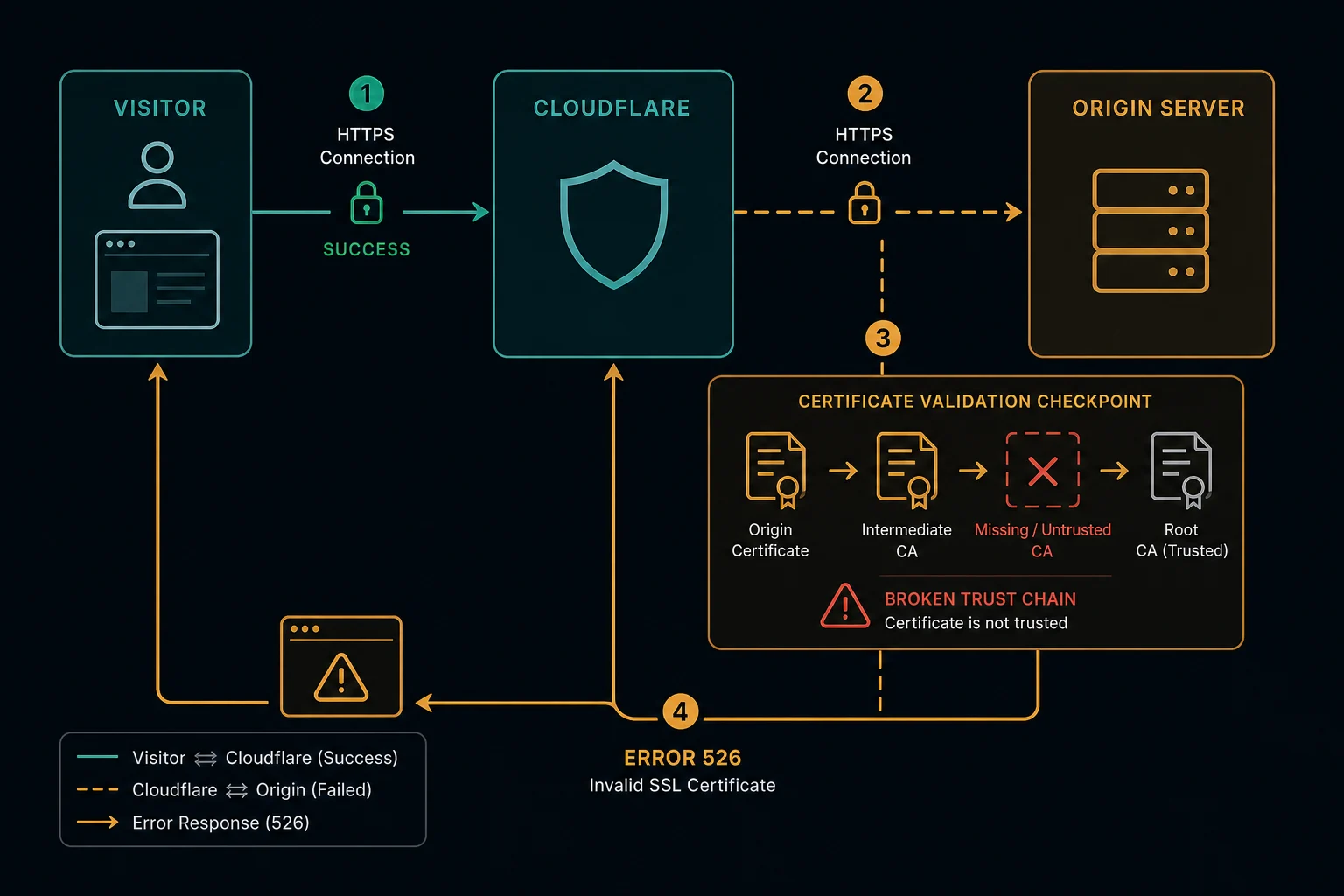
The request path usually looks like this:
- A visitor requests an HTTPS page on a Cloudflare-protected website.
- Cloudflare receives the request at the edge.
- Cloudflare connects to the origin over HTTPS.
- The origin presents a certificate.
- Cloudflare validates the certificate against the configured SSL/TLS mode.
- Validation fails, so Cloudflare returns Error 526.
That means the visitor's browser may have a valid HTTPS connection to Cloudflare, while Cloudflare refuses to trust the certificate used by the origin behind Cloudflare.
Cloudflare Error 526 vs. 525
Error 525 and 526 both involve HTTPS between Cloudflare and the origin, but they point to different failure points.
| Error | Meaning | First place to check |
|---|---|---|
| 525 | SSL handshake failed | TLS handshake, port 443, SNI, ciphers, private key, chain |
| 526 | Invalid SSL certificate | Certificate expiration, hostname match, trusted CA, complete chain, Full strict mode |
With 525, Cloudflare cannot complete the handshake. The origin may close the connection, serve incompatible TLS settings, or have a low-level TLS configuration issue.
With 526, Cloudflare can inspect the certificate but does not accept it as valid. That usually means the certificate is expired, self-signed without being trusted by Cloudflare, missing intermediates, revoked, or not valid for the requested hostname.
Cloudflare 52x Origin Error Overview
Cloudflare 52x errors are origin-side failures. Use the exact code to narrow the layer.
| Error | Meaning | First place to check |
|---|---|---|
| 520 | Web server returned an unknown error | Origin logs, crashes, malformed responses, headers |
| 521 | Web server is down | Origin service, refused connections, firewall blocks |
| 522 | Connection timed out | Origin reachability, network path, firewalls, overload |
| 523 | Origin is unreachable | DNS, routing, origin IP, network reachability |
| 524 | A timeout occurred | Slow origin response after a connection was made |
| 525 | SSL handshake failed | TLS handshake, certificate chain, cipher support |
| 526 | Invalid SSL certificate | Origin certificate validity in Full strict mode |
If Cloudflare cannot connect to the origin, start with 521 or 522. If the connection works but HTTPS validation fails, focus on 525 and 526.
Why Cloudflare Error 526 Happens
Common causes include:
- The origin certificate is expired.
- The certificate was revoked.
- The certificate is self-signed and Cloudflare is not configured to trust it.
- The certificate is not valid for the requested hostname.
- The certificate Common Name or Subject Alternative Name does not cover the subdomain.
- The origin serves an incomplete certificate chain.
- The wrong certificate is served because SNI is misconfigured.
- A load balancer or reverse proxy has a stale certificate.
- Full strict SSL/TLS mode is enabled, but the origin certificate is not valid.
- A Worker subrequest or Zero Trust flow is validating an external origin strictly.
- One backend in a pool has a different certificate from the others.
Intermittent 526 errors often point to inconsistent upstreams. One server may have the renewed certificate while another still serves an expired or incomplete chain.
How to Fix Error 526 as a Visitor
Visitors have limited control because the failure happens between Cloudflare and the origin.
Try:
- Refresh once.
- Wait a few minutes in case the site is renewing a certificate.
- Try another browser or network to confirm it is not local.
- Contact the website owner with the URL, timestamp, and screenshot.
Changing local browser certificate settings usually will not fix a true 526. Your browser connects to Cloudflare; Cloudflare is the party rejecting the origin certificate.
How to Fix Error 526 as a Website Owner
Start with the origin certificate for the exact hostname that failed.
Check:
- The certificate is not expired.
- The certificate is not revoked.
- The requested hostname is in the certificate's Common Name or Subject Alternative Name.
- The certificate chain includes the required intermediate certificates.
- The origin serves the correct certificate for the hostname through SNI.
- The private key matches the certificate.
- Port 443 is open and serving HTTPS.
- All load-balanced upstreams have the same certificate and chain.
- Reverse proxies and CDN-to-origin hops are not serving stale certificates.
Then check Cloudflare settings:
- Confirm the site is intentionally using Full strict SSL/TLS mode.
- Use a publicly trusted certificate, a Cloudflare Origin CA certificate, or a trusted custom origin certificate.
- Avoid switching to Full as a permanent fix unless you understand the reduced certificate validation.
- Review recent certificate renewals, hostname changes, and load balancer changes.
- For Workers or Zero Trust paths, check whether the upstream host is validated under stricter rules than the zone setting.
If only one subdomain fails, the certificate probably does not cover that hostname or the origin virtual host is serving the wrong certificate. If every hostname fails, check certificate expiration, trust, chain, and Cloudflare SSL/TLS mode first.
How to Diagnose 526 Quickly
Use this sequence:
- Identify the exact failing hostname.
- Test the origin certificate for that hostname, not only the apex domain.
- Check expiration, revocation, hostname coverage, and intermediate chain.
- Confirm SNI returns the expected certificate.
- Compare certificates across all upstream servers.
- Review recent certificate renewals, DNS changes, load balancer changes, and proxy config changes.
- Confirm Cloudflare SSL/TLS mode and any Workers or Zero Trust behavior.
If direct HTTPS to the origin shows certificate warnings, fix the origin before changing Cloudflare. If direct HTTPS looks valid but Cloudflare still returns 526, check whether Cloudflare is reaching a different origin IP, different virtual host, or different upstream server.
If the failing hostname is tunnel-backed, compare it with Cloudflare Error 1033. If certificate validation is happening inside a Worker subrequest or Worker route, Cloudflare Error 1101 may be the more useful debugging path.
Can Proxies Fix Cloudflare Error 526?
Usually, no. Error 526 is not a visitor-side access block or rate limit. It means Cloudflare rejected the SSL certificate served by the origin.
If you are scraping, monitoring, or botting and see 526, log it as target-side HTTPS instability. Slow retry behavior is better than aggressive retry storms because repeated requests do not repair an invalid origin certificate.
Proxies are useful for legitimate distributed monitoring, geo testing, and reducing false positives in access workflows. They do not change whether Cloudflare trusts the target site's origin certificate. For visitor-specific blocks, read HTTP 403 Forbidden, HTTP 429 Too Many Requests, and Cloudflare Error 1020.
How to Prevent Cloudflare Error 526
For site owners, prevention means treating origin certificate health as production infrastructure.
Use these practices:
- Monitor certificate expiration before renewal windows.
- Automate renewal and validate the deployed certificate chain.
- Test every hostname covered by the certificate.
- Confirm SNI behavior after adding subdomains.
- Keep load-balanced upstreams on the same certificate version.
- Use health checks that validate HTTPS, not only open ports.
- Review Cloudflare SSL/TLS mode before migrations.
- Keep origin certificate deployment tied to rollback checks.
- Alert on certificate validation failures before users report them.
If 526 appears after every renewal, check whether the renewal job updates only one server, misses intermediate certificates, or reloads the wrong web server process.
FAQ
What does Cloudflare Error 526 mean?
Cloudflare Error 526 means Cloudflare could not validate the SSL certificate presented by the origin server.
Is Error 526 caused by my browser?
Usually, no. Your browser connects to Cloudflare successfully enough to see the error. The certificate validation failure happens between Cloudflare and the origin.
Is Error 526 the same as Error 525?
No. Error 525 means the SSL handshake failed. Error 526 means Cloudflare rejected the origin certificate as invalid.
Can an expired certificate cause Error 526?
Yes. An expired certificate is one of the most common causes of Error 526, especially when Cloudflare is using Full strict SSL/TLS mode.
Does changing proxies fix invalid SSL certificate error code 526?
Usually not. The invalid certificate is on the origin side. Changing visitor IPs does not fix certificate expiration, hostname mismatch, trust, revocation, or chain problems.
Final Thoughts
Cloudflare Error 526 means Cloudflare rejected the origin SSL certificate. Visitors can wait and report it, but site owners should check certificate expiration, revocation, hostname coverage, chain completeness, SNI, upstream consistency, and Cloudflare SSL/TLS mode.
For related origin errors, compare this with Cloudflare Error 525 for SSL handshake failures and Cloudflare Error 522 for origin connection timeouts.
Technical reference: Cloudflare Error 526 documentation.