Cloudflare Error 522 means Cloudflare connected to a website's DNS and edge layer, but could not complete a TCP connection to the origin server in time.
For visitors, Error 522 usually means the site has an origin-side availability problem. Refreshing may work if the issue is brief, but the real fix usually belongs to the website owner or hosting provider.
For website owners, Error 522 is a connection problem between Cloudflare and the origin. The origin may be overloaded, offline, firewalling Cloudflare, dropping packets, misrouting traffic, or accepting connections too slowly.
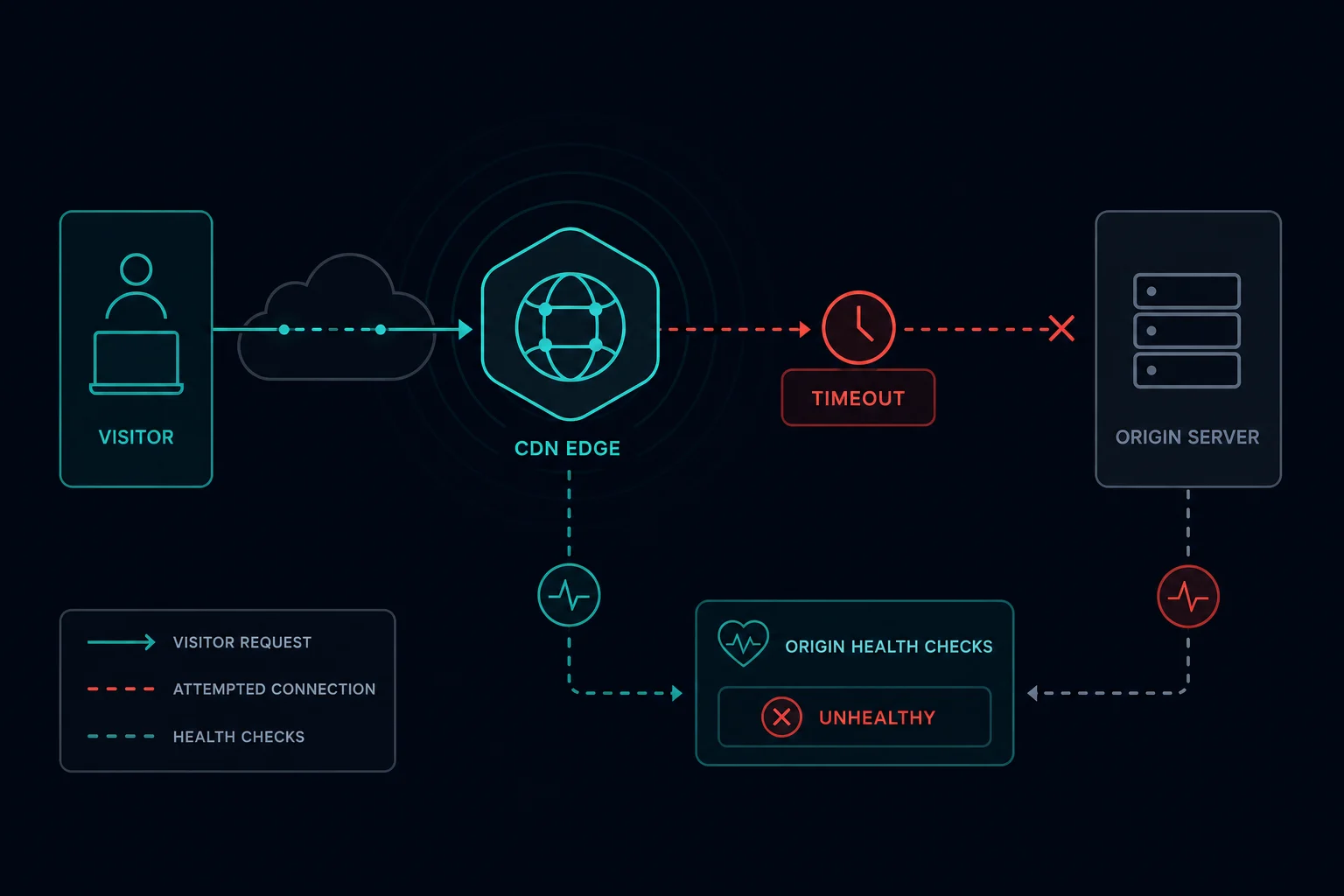
Quick Answer: How to Fix Cloudflare Error 522
Start with the role that matches you:
| Situation | Best first step |
|---|---|
| You are a visitor | Refresh once, wait a few minutes, and contact the site owner if it persists |
| You own the site | Confirm the origin server is online and accepting connections on ports 80 or 443 |
| Firewall is strict | Allow Cloudflare IP ranges and remove rules that block Cloudflare edge traffic |
| Origin is overloaded | Check CPU, memory, workers, database load, queues, and connection limits |
| DNS or routing changed | Verify Cloudflare DNS points to the correct origin IP |
| Only some regions fail | Check hosting network, routing, and regional firewall behavior |
Error 522 is different from Cloudflare Error 521, where the origin refuses the connection or is down. It is also different from Cloudflare Error 524, where Cloudflare connects to the origin but the origin takes too long to respond.
What Is Cloudflare Error 522?
Cloudflare Error 522 is a connection timeout between Cloudflare and the origin web server.
The request path looks like this:
- A visitor requests your website.
- Cloudflare receives the request at the edge.
- Cloudflare looks up the configured origin.
- Cloudflare tries to open a TCP connection to the origin.
- The origin does not complete the connection in time.
- Cloudflare returns Error 522 to the visitor.
That means Cloudflare itself is reachable. The problem is the connection from Cloudflare to the origin.
Cloudflare Error 522 vs. 521, 523, and 524
Cloudflare's 52x errors are related, but each points to a different part of the request path.
| Error | Meaning | First place to check |
|---|---|---|
| 520 | Web server returned an unknown error | Origin logs, malformed responses, crashes, headers |
| 521 | Web server is down | Origin service, refused connections, firewall blocks |
| 522 | Connection timed out | Origin reachability, network path, firewalls, overload |
| 523 | Origin is unreachable | DNS, routing, origin IP, network reachability |
| 524 | A timeout occurred | Slow origin response after a connection was made |
| 525 | SSL handshake failed | TLS handshake, certificate, cipher support |
| 526 | Invalid SSL certificate | Origin certificate validity in Full strict mode |
If the origin refuses the connection, think 521. If the origin cannot be reached at the configured IP, think 523. If the connection is made but the application is slow, think 524. If the problem happens during TLS, check 525 and certificate-validity issues like 526.
If the hostname uses Cloudflare Tunnel, a tunnel-specific failure may show as Cloudflare Error 1033 instead of a normal 52x origin timeout. If a Worker route throws while handling the request, compare it with Cloudflare Error 1101.
Why Cloudflare Error 522 Happens
Common causes include:
- The origin server is offline or restarting.
- The web server is not listening on the expected port.
- The origin firewall blocks Cloudflare IP ranges.
- Hosting security rules rate limit or drop Cloudflare traffic.
- The origin is overloaded and cannot accept new connections.
- Connection limits are too low.
- A load balancer has no healthy upstreams.
- DNS points Cloudflare to the wrong origin IP.
- Network routing between Cloudflare and the host is unstable.
- The origin drops packets instead of refusing connections cleanly.
For high-traffic sites, 522 often appears during spikes because the origin accepts fewer connections than Cloudflare needs to open. For smaller sites, it is often a firewall, host outage, DNS mistake, or web server process failure.
How to Fix Error 522 as a Visitor
Visitors have limited control because the failure happens between Cloudflare and the website's origin server.
Try:
- Refresh once.
- Wait a few minutes.
- Try another browser or network to confirm it is not a local issue.
- Check whether other pages on the same site work.
- Contact the site owner and include the time of the error.
Disabling your VPN or changing your browser usually will not fix a true 522. Unlike access blocks, this is usually not about your IP reputation or permissions.
How to Fix Error 522 as a Website Owner
Start at the origin.
Check:
- Is the server online?
- Is the web server running?
- Is it listening on the correct IP and port?
- Can you connect to the origin directly?
- Do server logs show connection attempts?
- Are CPU, memory, disk, workers, and connection counts healthy?
- Did DNS recently change?
- Did a firewall, WAF, host rule, or security plugin update recently?
Then check Cloudflare-specific access:
- Allow Cloudflare IP ranges through the origin firewall.
- Make sure hosting rate limits do not treat Cloudflare as an attacker.
- Confirm the origin accepts traffic on Cloudflare-supported ports.
- Check load balancer health checks and backend pools.
- Review security tools such as fail2ban, ModSecurity, host firewalls, and provider-level DDoS controls.
If the origin is overloaded, raising timeouts alone is usually the wrong fix. Find the bottleneck: web workers, database connections, queue depth, cache misses, slow upstream APIs, or autoscaling delay.
How to Diagnose 522 Quickly
Use a narrow checklist:
- Confirm Cloudflare DNS points to the correct origin IP.
- Check whether the origin is reachable from outside the host network.
- Confirm the web server is listening on the expected port.
- Inspect firewall logs for dropped Cloudflare connections.
- Check system load and connection limits during the error window.
- Review recent deploys, DNS changes, host changes, and firewall changes.
- Compare successful and failed regions if the error is intermittent.
If direct origin access is fast but Cloudflare still returns 522, the issue is likely firewalling, routing, or host-level filtering of Cloudflare traffic. If direct origin access is also slow or failing, fix the origin first.
Can Proxies Fix Cloudflare Error 522?
Usually, no. Error 522 is not a normal visitor block and not a scraping rate-limit response. It means Cloudflare could not connect to the origin server in time.
Changing proxies may make the error appear inconsistent if some Cloudflare edge locations take different network paths, but proxies do not repair an origin that is overloaded, offline, firewalling Cloudflare, or misconfigured.
If you are scraping and seeing 522 on a target site, treat it as target-side instability first. Slow your requests down, avoid retry storms, and do not keep hammering an origin that is already failing. For rate-limit and block issues, the more relevant guides are HTTP 429 Too Many Requests, Cloudflare Error 1015, and HTTP 403 Forbidden.
How to Prevent Cloudflare Error 522
For site owners, prevention is origin reliability.
Use these practices:
- Keep Cloudflare IP ranges allowlisted.
- Monitor origin health from outside your host network.
- Set sensible web server worker and connection limits.
- Use caching for expensive pages.
- Keep database and upstream API latency visible.
- Add autoscaling or queueing before traffic spikes.
- Avoid firewall rules that silently drop Cloudflare traffic.
- Keep DNS records accurate after migrations.
- Monitor load balancer backend health.
- Alert on connection saturation before users see 522.
If the site is frequently overloaded, optimize the application rather than only increasing server size. Cache misses, slow database queries, and blocked worker pools can all create connection pressure.
FAQ
What does Cloudflare Error 522 mean?
Cloudflare Error 522 means Cloudflare could not complete a TCP connection to the origin server before the connection attempt timed out.
Is Error 522 caused by Cloudflare?
Usually the cause is on the origin side or the network path between Cloudflare and the origin. Cloudflare is reachable enough to show the error page, but it cannot connect to the origin in time.
Is Cloudflare Error 522 the same as 524?
No. Error 522 means Cloudflare could not complete the connection to the origin. Error 524 means Cloudflare connected, but the origin took too long to send a response.
Can a firewall cause Error 522?
Yes. If the origin firewall blocks, rate limits, or silently drops Cloudflare IP ranges, Cloudflare may return Error 522.
Does changing DNS fix Error 522?
It can if Cloudflare is pointing to the wrong origin IP. If DNS is correct, focus on origin uptime, firewall rules, network reachability, and server load.
Final Thoughts
Cloudflare Error 522 is a connection timeout between Cloudflare and the origin server. Visitors can wait and report the issue, but site owners need to check origin uptime, firewall rules, DNS, routing, server load, and connection limits.
If your issue is a visitor or scraper rate limit instead of an origin connection timeout, read HTTP 429 Too Many Requests or Cloudflare Error 1015. For nearby origin failures, compare this with Cloudflare Error 520 and Cloudflare Error 525.
Technical reference: Cloudflare Error 522 documentation.