Cloudflare Error 1020 means the site you are trying to reach has denied your request with a Cloudflare firewall rule. In normal browsing, that can look like a sudden "Access denied" page. In scraping, monitoring, or automation workflows, it usually means your request pattern, IP reputation, browser signature, location, or headers matched a rule that either the website owner configured, or the website's antibot configured.
Error 1020 is not the same as a website outage. The origin server may be working perfectly. Cloudflare blocked the request before it reached the site. If Cloudflare cannot connect to the origin instead, compare the symptoms with Cloudflare Error 521 and Cloudflare Error 522.
If you are scraping a site, you should start by identifying why your request looks risky. Sometimes that means slowing down. Sometimes it means fixing headers, cookies, or sessions. Sometimes it means using cleaner residential or ISP proxies so legitimate requests are not all coming from the same flagged network.
Quick Answer: How to Fix Cloudflare Error 1020
| Situation | Best first step |
|---|---|
| You are a normal visitor | Refresh, disable suspicious extensions, clear cookies, try another browser, or contact the site owner with the Ray ID |
| You own the website | Search Cloudflare Security Events for the Ray ID or visitor IP, then adjust the blocking rule |
| You are running a scraper | Reduce request rate, preserve sessions, use realistic headers, double check your requests for any inconsistency with real requests, and check whether your proxy IPs are being blocked |
| Only one proxy subnet fails | Switch to Unknown Proxies residential or ISP proxies and avoid hammering the same endpoint |
| Every request fails | Confirm the target allows your use case before changing proxy infrastructure |
Cloudflare's own documentation describes Error 1020 as access denied by a firewall rule. For site owners, Cloudflare recommends checking Security Events using the Ray ID or client IP from the error page.
What Is Cloudflare Error 1020?
Cloudflare Error 1020 is an access denial triggered by a Cloudflare security rule. The rule is controlled by the website owner, not by the visitor.
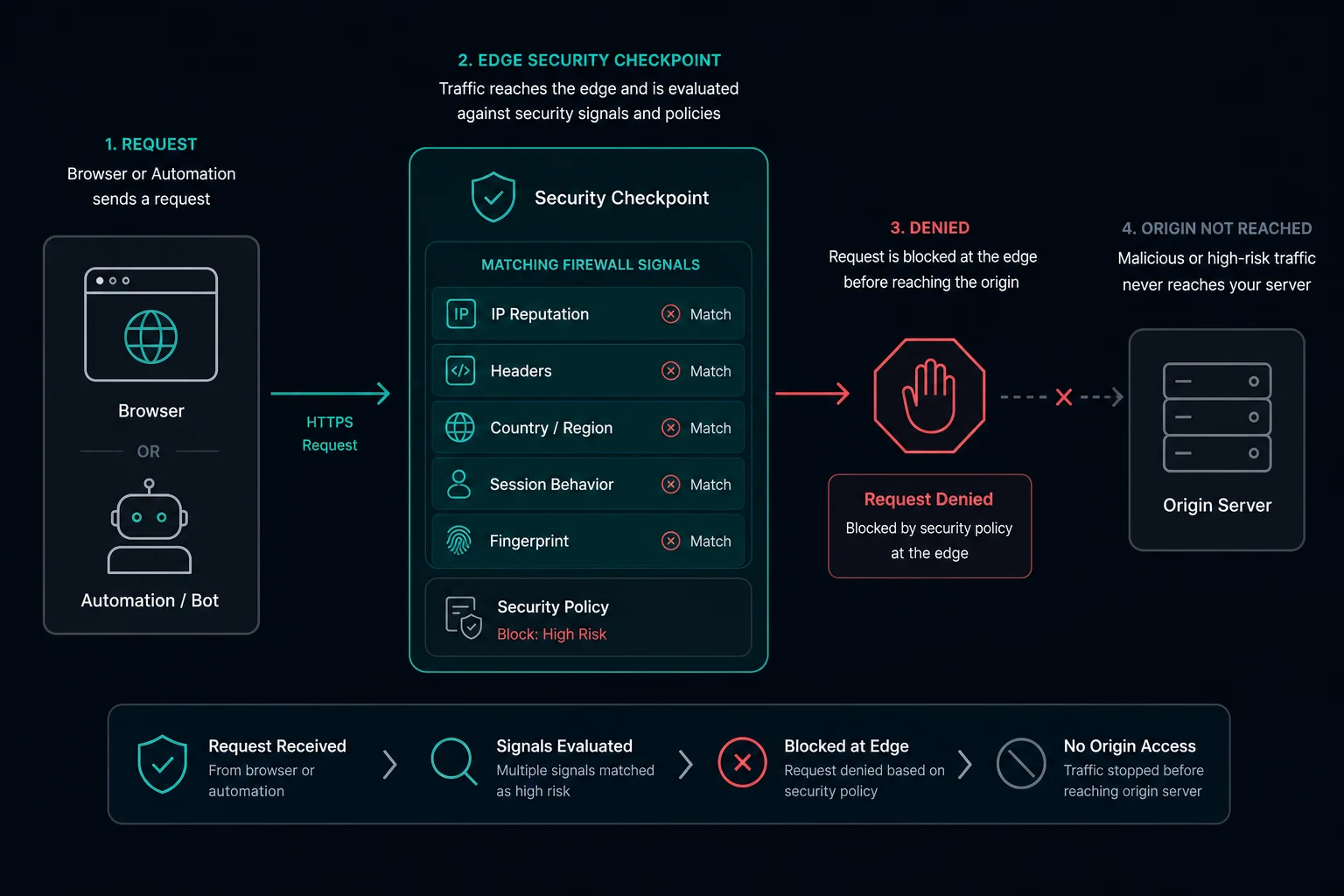
In practice, this means Cloudflare received your request, evaluated it, and decided not to forward it to the origin server. The browser may show a page with:
Error 1020Access denied- A Cloudflare Ray ID
- A timestamp
- The domain you tried to access
For developers and scraper operators, that Ray ID is useful. It gives the site owner a way to find the exact blocked request in Cloudflare's logs.
Why Cloudflare Error 1020 Happens
Cloudflare Error 1020 usually happens because the request matched a rule based on one or more signals:
- IP address or IP reputation
- Country, region, ASN, or network
- Request path or endpoint
- User agent
- Missing or unusual headers
- Cookies or session state
- Request frequency, including HTTP 429-style rate-limit behavior
- Browser or client fingerprint
- Known datacenter, VPN, or proxy traffic
- Suspicious automation behavior
For regular users, that can be a false positive. For scrapers and automation tools, it is often a sign that the traffic profile is too easy to classify as automated.
Cloudflare Error 1020 vs. Error 1005 vs. HTTP 403
Error 1020 is related to access denial, and the response may appear as a forbidden request. The difference is where the decision happens.
With a normal HTTP 403 Forbidden, the origin server or application may be rejecting the request. With Cloudflare Error 1020, Cloudflare is blocking the request at the edge because a security rule matched.
If the page specifically says the ASN is banned, compare it with Error 1005 access denied. Error 1005 points to an Autonomous System Number block, while Error 1020 can be caused by a broader Cloudflare firewall rule.
That distinction matters because changing your application request alone may not fix the issue if the block is tied to IP reputation, country, ASN, or Cloudflare firewall settings.
How to Fix Error 1020 as a Website Visitor
If you are just trying to visit a website in your browser, start with basic checks before assuming anything is wrong with the site:
- Refresh the page after a minute.
- Clear cookies for the domain and try again.
- Disable browser extensions that modify requests, privacy headers, cookies, or scripts.
- Try a different browser or device.
- Turn off VPNs or low-quality public proxies.
- Contact the website owner and include the Ray ID shown on the error page.
Cloudflare support generally cannot override a website owner's access rules. The owner of the site has to review the block and decide whether to allow the request.
How to Fix Error 1020 as a Website Owner
If visitors are reporting Error 1020 on your own site, the fastest path is to debug the exact request that was blocked.
Ask the visitor for:
- A screenshot of the error page
- The Cloudflare Ray ID
- The timestamp
- Their approximate location
- The URL they were trying to access
- Whether they were using a VPN, proxy, corporate network, or privacy extension
Then check Cloudflare Security Events for the Ray ID or client IP. Once you find the event, inspect which rule triggered the block. You may need to:
- Adjust an overly broad firewall rule
- Allowlist a trusted IP or country
- Exclude a safe path from a strict rule
- Change a block action to a managed challenge
- Update bot or WAF settings if legitimate users are being caught
Do not simply disable security rules across the whole site unless you understand why they fired. A narrow exception is usually safer than removing a useful rule entirely.
How to Fix Cloudflare Error 1020 When Scraping
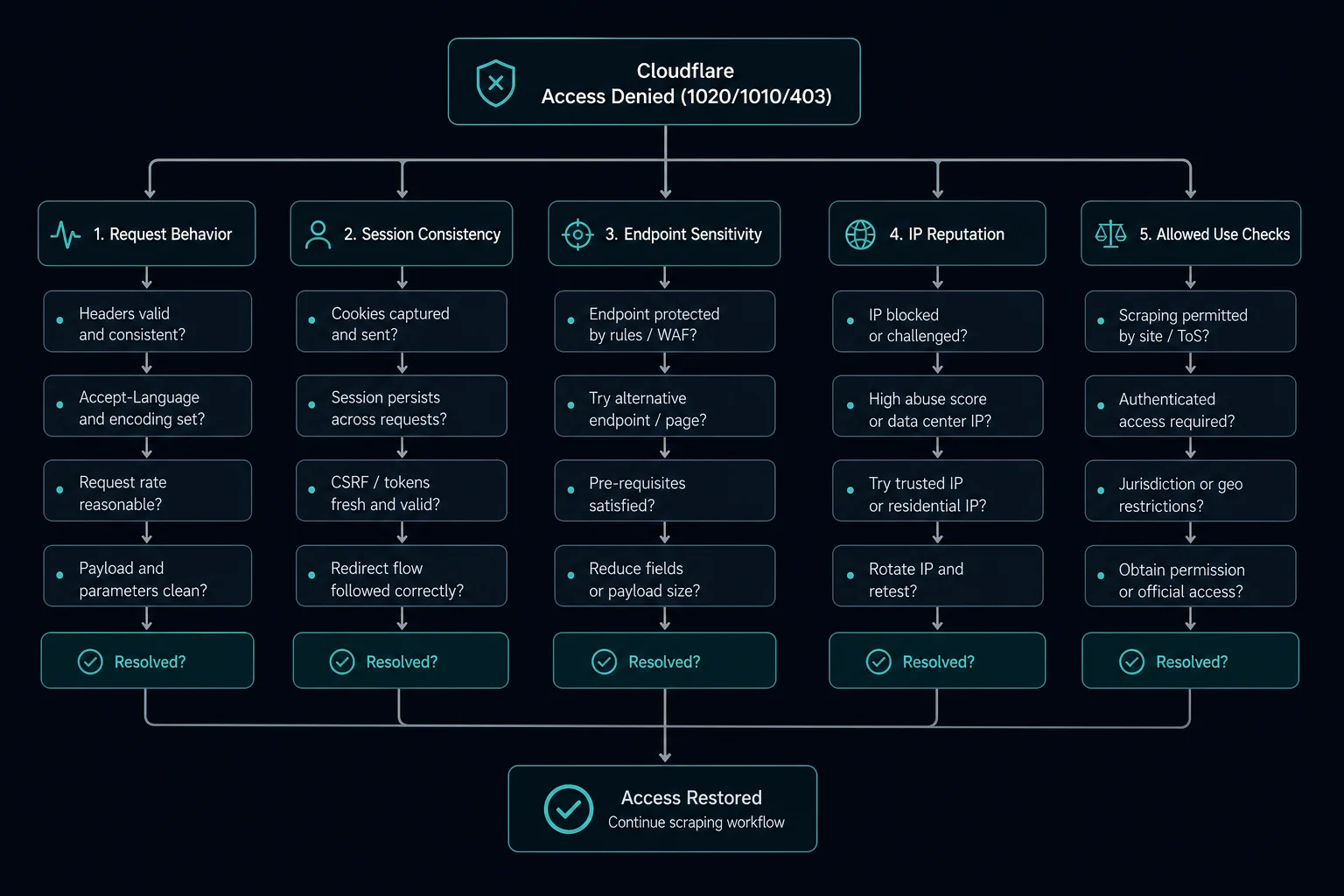
For scraping, Error 1020 means Cloudflare does not like something about your request. Do not jump straight to rotating IPs. First, confirm your scraper is sending clean, consistent traffic.
Start with these checks:
- Make sure the target allows your use case and that you are following its terms and robots guidance.
- Lower your request rate and remove bursty retry loops. If the site returns a plain too-many-requests response instead, use the HTTP 429 Too Many Requests guide.
- Keep cookies and sessions consistent instead of starting every request from scratch.
- Use headers that match the client you are actually running.
- Avoid switching user agents too frequently within the same session.
- Check whether login, search, cart, or API endpoints have stricter rules than public pages.
- Log response codes by URL, proxy, user agent, and session so you can isolate the trigger.
- Avoid retrying blocked requests immediately from the same IP.
If the same request succeeds locally but fails through your proxy, the proxy network may be the issue. In that case, switch to a cleaner provider instead of burning more retries on the same flagged IPs. Unknown Proxies residential and ISP proxies are built for scraping, monitoring, and account workflows where IP reputation and stable sessions matter.
If it fails everywhere, the site may be intentionally blocking your behavior or use case. Fix the request pattern first, then use better proxies to keep legitimate traffic from being grouped into one risky network.
When Proxies Help With Error 1020
Proxies can help when the 1020 block is tied to IP-based signals, especially if your scraper is sending too much traffic from one address or from a network with poor reputation.
For legitimate scraping and monitoring, high-quality proxies can help you:
- Spread requests across cleaner IPs
- Test access from different regions
- Avoid concentrating traffic on a single datacenter IP
- Keep separate sessions isolated
- Reduce false positives caused by shared or abused networks
The practical fix is to use Unknown Proxies residential and ISP plans when your current proxy pool is causing Cloudflare 1020 blocks. Residential proxies are usually better for rotating, location-sensitive browsing patterns. ISP proxies are useful when you need stable, fast IPs with stronger reputation than typical datacenter ranges.
Proxies do not make every 1020 disappear. If the site owner blocks your use case, requires authentication, challenges browser fingerprints, or forbids automated access, changing IPs alone will not solve the real problem.
Residential vs. ISP Proxies for Cloudflare 1020
Choose the proxy type based on what is triggering the block.
| Proxy type | Best for | Tradeoff |
|---|---|---|
| Residential proxies | Rotating traffic, geo-targeted browsing, testing from consumer-like networks | Usually priced by bandwidth and may be slower than ISP proxies |
| ISP proxies | Stable sessions, account workflows, retail monitoring, lower-latency scraping | Less rotation than residential pools |
| Datacenter proxies | Fast, low-cost requests on permissive sites | More likely to be filtered by strict anti-bot systems |
If you are not sure what is failing, test with a small controlled run. Keep the target URL, headers, cookies, rate, and session logic constant. Change only the proxy pool. That makes it much easier to tell whether the block is caused by your IPs or by the request behavior itself.
How to Prevent Error 1020 in Scraping Workflows
The best way to reduce Error 1020 is to build your scraper like a stable client instead of a noisy script.
Use these practices:
- Set conservative delays between requests.
- Add jitter instead of sending requests on an exact fixed interval.
- Respect rate limits and back off when errors increase. For Cloudflare-branded rate limits, compare this with Cloudflare Error 1015.
- Reuse sessions where a real browser would reuse sessions.
- Keep headers internally consistent.
- Monitor block rates by proxy pool and endpoint.
- Separate high-risk endpoints from low-risk endpoints.
- Remove dead, banned, or low-performing proxies from rotation.
- Avoid retry storms when a site starts blocking traffic.
If you are monitoring multiple products, pages, or SKUs, calculate how many proxies you need before scaling up. The Unknown Proxies delay calculator can help you estimate proxy-to-task requirements instead of overloading a small proxy list.
FAQ
What does Cloudflare Error 1020 mean?
Cloudflare Error 1020 means access was denied because the request matched a Cloudflare firewall rule configured by the website owner.
Is Error 1020 caused by my proxy?
Sometimes. If the same request works without the proxy but fails through a specific proxy pool, IP reputation, ASN, or location may be the trigger. If it fails everywhere, the request behavior or the site's access policy may be the problem.
Can I fix Error 1020 by changing my user agent?
Changing the user agent can help only if the block is tied to that header or to an inconsistent browser profile. If the issue is IP reputation, rate, cookies, or a firewall rule, changing the user agent alone will not fix it.
Does Cloudflare Error 1020 mean the website is down?
No. Error 1020 usually means Cloudflare blocked your request before it reached the origin server. Other users may still be able to access the site.
What is a Cloudflare Ray ID?
A Cloudflare Ray ID is an identifier attached to a request handled by Cloudflare. Site owners can use it to find the matching event in Cloudflare logs and see which rule blocked the request.
What proxies are best for avoiding Error 1020?
For legitimate scraping, residential proxies and ISP proxies are usually better than low-quality datacenter proxies on strict sites. The best choice depends on whether you need rotation, stable sessions, location targeting, or speed.
Final Thoughts
Cloudflare Error 1020 is an access-denied response caused by a Cloudflare firewall rule. For visitors, the best fix is usually to remove suspicious browser or network signals and contact the site owner with the Ray ID. For site owners, the answer is in Cloudflare Security Events. For scrapers, the right fix is careful debugging: slow down, clean up request behavior, preserve sessions, and use reliable proxy infrastructure only when IP quality is actually part of the problem.
If your scraping workflow is getting blocked because too much traffic is coming from the same IPs or from poor-quality networks, the fix is to upgrade the proxy layer. Compare Unknown Proxies plans or go straight to purchase proxies for cleaner residential and ISP infrastructure.
Technical reference: Cloudflare Error 1020 documentation.