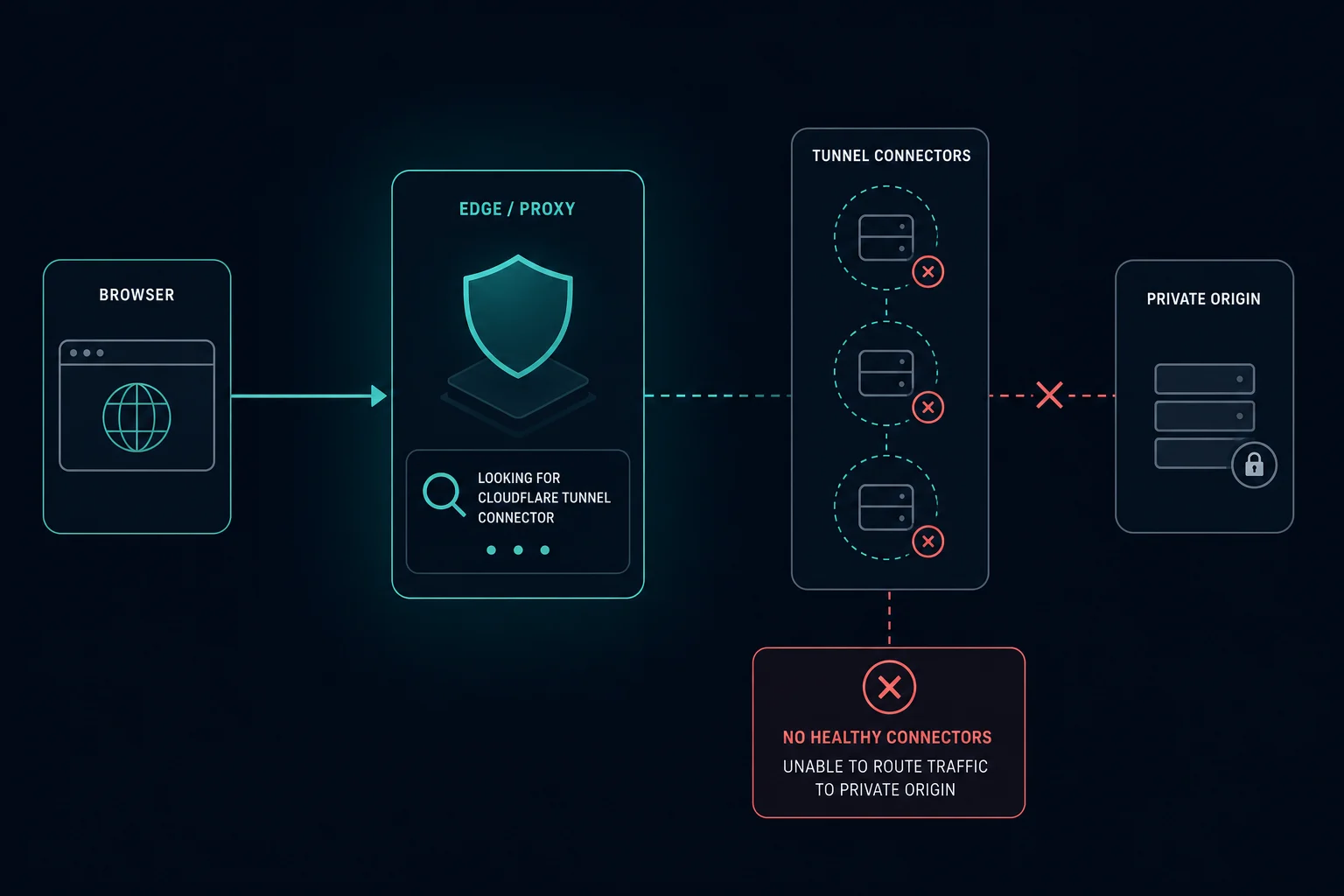
Cloudflare Error 1033 means a hostname is configured to use Cloudflare Tunnel, formerly called Argo Tunnel, but Cloudflare cannot find a healthy cloudflared connector to receive the request.
For visitors, Error 1033 is normally not something to fix in the browser. The tunnel-backed service is unavailable from Cloudflare's side because the connector is inactive, down, degraded, misconfigured, or unable to reach Cloudflare.
For site owners, the fix starts with Cloudflare Tunnel status and the cloudflared process. Check whether the tunnel is active, whether the connector is running as a service, and whether local firewall or network rules are blocking outbound tunnel connections.
Quick Answer: How to Fix Cloudflare Error 1033
Use the path that matches your role:
| Situation | Best first step |
|---|---|
| You are a visitor | Refresh once, wait, and report the URL and time to the site owner |
| You own the site | Check whether the tunnel is Active in the Cloudflare dashboard |
cloudflared is stopped |
Restart the connector or run the tunnel as a service |
| Tunnel is inactive | Run cloudflared tunnel run or deploy the connector where the service lives |
| Tunnel is degraded | Review cloudflared logs and local network or firewall rules |
| Other origin errors appear | Compare with 521, 522, 523, and 520 before changing app code |
Cloudflare's documentation says Error 1033 appears when Cloudflare cannot find a healthy cloudflared instance to receive tunnel traffic.
What Is Cloudflare Error 1033?
Cloudflare Error 1033 is a tunnel connectivity error. It appears when a Cloudflare-protected hostname is routed through Cloudflare Tunnel but the tunnel is not currently connected in a healthy way.
The request path usually looks like this:
- A visitor requests a tunnel-backed hostname.
- Cloudflare receives the request.
- Cloudflare tries to route the request through Cloudflare Tunnel.
- No healthy
cloudflaredconnector is available. - Cloudflare returns Error 1033.
The local service behind the tunnel might be healthy, but Cloudflare cannot reach it through the tunnel connection.
Error 1033 vs. 521, 522, 523, 1005, and 1101
Error 1033 is easy to confuse with origin and access errors. The layer is different.
| Error | Meaning | First place to check |
|---|---|---|
| Error 1033 | Tunnel connector unavailable | Cloudflare Tunnel status and cloudflared health |
| Cloudflare Error 521 | Origin refused or could not accept the connection | Origin service, port, firewall, and server health |
| Cloudflare Error 522 | Origin connection timed out | Network path, firewall drops, overload, routing |
| Cloudflare Error 523 | Origin is unreachable | DNS, origin IP, and routing |
| Cloudflare Error 1005 | ASN banned | Cloudflare access rules and Security Events |
| Cloudflare Error 1101 | Worker threw an exception | Worker logs and runtime code |
If the hostname uses a normal public origin, start with the 52x guides. If it is routed through Cloudflare Tunnel, start with the tunnel connector.
Why Cloudflare Error 1033 Happens
Common causes include:
- The
cloudflaredprocess is not running. - The tunnel was created but never connected.
- The connector machine is powered off or disconnected.
- A recent deploy stopped the tunnel service.
- Firewall or network rules block outbound tunnel connections.
- The tunnel token or credentials were changed or removed.
- DNS or route configuration points the hostname to the wrong tunnel.
- The connector is degraded because one or more connections failed.
- The local service moved, but the tunnel config still points to the old target.
The fastest clue is tunnel status. Healthy means the tunnel is active and serving traffic. Inactive, down, or degraded means the connector needs attention before debugging the application.
How to Fix Error 1033 as a Visitor
Visitors have limited control because the problem is normally the website's tunnel setup.
Try:
- Refresh once.
- Wait a few minutes.
- Check whether other pages on the same site work.
- Contact the site owner with the URL, timestamp, and screenshot.
Changing proxies, clearing cookies, or switching user agents usually will not fix a true Error 1033.
How to Fix Error 1033 as a Site Owner
Start with the tunnel, not the application.
Check:
- Is the tunnel listed as Active in Zero Trust > Networks > Connectors > Cloudflare Tunnels?
- Does
cloudflared tunnel listshow the expected tunnel? - Is the
cloudflaredservice running on the connector machine? - Did the server reboot, crash, or lose network access?
- Do
cloudflaredlogs show connection failures? - Did credentials, tokens, or tunnel routes change?
- Does the tunnel config still point to the correct local service?
If the tunnel is inactive, run the connector again or install it as a service. If it is down, restart the service and check the host. If it is degraded, inspect the logs and local firewall behavior.
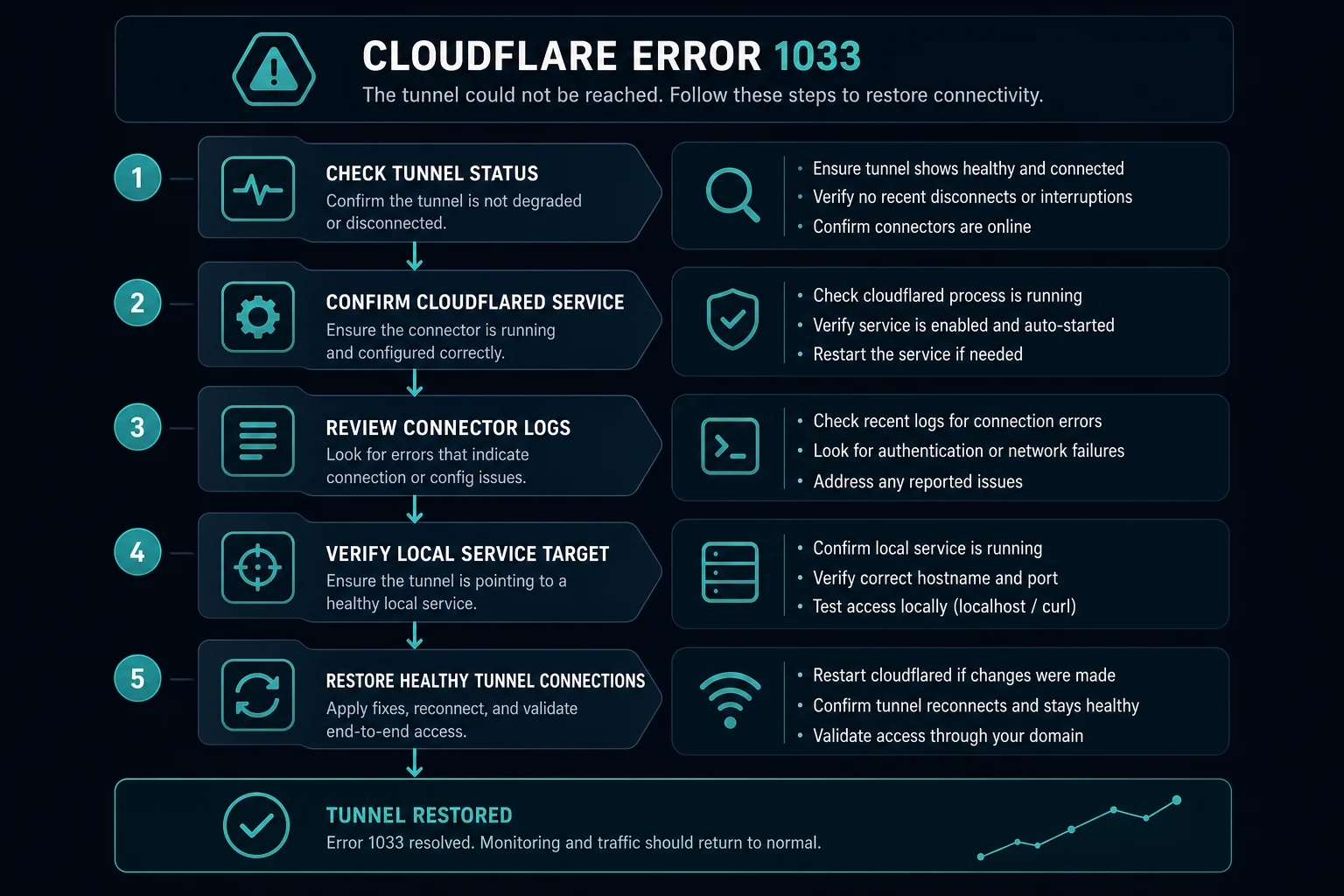
How to Diagnose Error 1033 Quickly
Use this sequence:
- Confirm the hostname is supposed to use Cloudflare Tunnel.
- Check tunnel status in the dashboard or with
cloudflared tunnel list. - Restart or start the
cloudflaredconnector if it is inactive or down. - Check connector logs for authentication, DNS, firewall, or network errors.
- Confirm the local service is reachable from the connector machine.
- Verify public hostname routes and tunnel configuration.
- Review recent server restarts, deploys, firewall changes, and token rotations.
If the tunnel is healthy but the app still fails, then move to normal origin debugging. For unexpected origin responses, read Cloudflare Error 520. For connection failures, compare 521, 522, and 523.
Can Proxies Fix Cloudflare Error 1033?
Usually, no. Error 1033 is not an IP reputation block, rate limit, or visitor-side access denial. It means Cloudflare cannot route the request through a healthy tunnel connector.
If you are scraping or monitoring and see Error 1033 on a target site, treat it as target-side infrastructure instability. Slow retries, log the error separately, and avoid retry storms. If the issue is actually access denial, compare it with Error 1005, Error 1020, or HTTP 403 Forbidden.
How to Prevent Error 1033
For tunnel-backed services:
- Run
cloudflaredas a managed service. - Monitor connector health and tunnel status.
- Keep at least the expected number of connector connections healthy.
- Alert when the connector process stops.
- Review tunnel logs after deploys and host restarts.
- Keep credentials and tunnel tokens managed through a controlled process.
- Test public hostname routes after config changes.
- Keep local service health checks separate from tunnel health checks.
The important split is simple: a healthy app behind an unhealthy tunnel still returns Error 1033.
FAQ
What does Cloudflare Error 1033 mean?
Cloudflare Error 1033 means a Cloudflare Tunnel-backed hostname cannot be resolved to a healthy cloudflared connector.
Is Error 1033 the same as Argo Tunnel error?
Yes. Many people still search for Argo Tunnel error because Cloudflare Tunnel was previously known as Argo Tunnel.
Can visitors fix Error 1033?
Usually not. Visitors can refresh and report the URL and time. The website owner needs to restore the tunnel connector.
Does Error 1033 mean the origin server is down?
Not necessarily. The local origin may be healthy, but Cloudflare cannot reach it through the tunnel.
Should I debug DNS first?
Check the tunnel route and public hostname configuration, but also verify tunnel status. Error 1033 commonly means no healthy connector is available, not just a DNS typo.
Final Thoughts
Cloudflare Error 1033 means Cloudflare cannot route a request through a healthy Cloudflare Tunnel connector. For site owners, the fix is usually to restore cloudflared, review tunnel status, check connector logs, and confirm the local service route.
For nearby infrastructure errors, compare this with Cloudflare Error 520, Cloudflare Error 521, Cloudflare Error 522, and Cloudflare Error 523. If the failure is access denied or Worker runtime code instead, read Cloudflare Error 1005 or Cloudflare Error 1101.
Technical references: Cloudflare Error 1033 documentation and Cloudflare Tunnel troubleshooting.