Cloudflare Error 1101 means a Cloudflare Worker threw a JavaScript exception, failed during runtime, or ended without returning a valid response.
For visitors, Error 1101 is usually not a browser or proxy problem. The site owner's Worker code, route, binding, subrequest, or deployment is failing before Cloudflare can return the intended page.
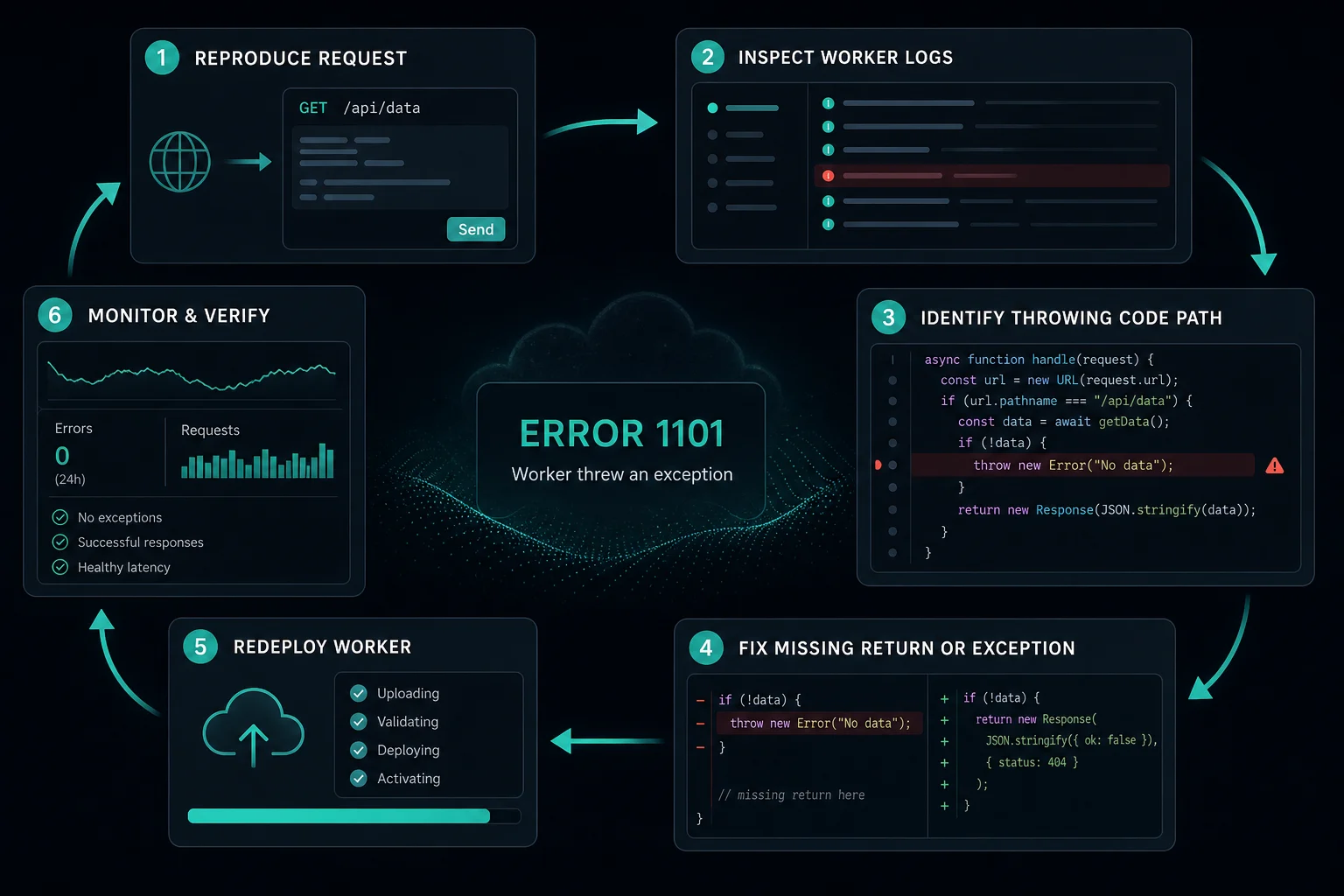
For developers, the fix starts in Worker logs. Reproduce the request, inspect wrangler tail, check recent deploys, and identify the code path that throws or never returns a Response.
Quick Answer: How to Fix Cloudflare Error 1101
Start here:
| Situation | Best first step |
|---|---|
| You are a visitor | Refresh once and report the URL, time, and screenshot to the site owner |
| You maintain the Worker | Reproduce the request and inspect Worker logs with wrangler tail |
| It started after a deploy | Roll back or compare the failing route against the last working deployment |
| Only one path fails | Check route-specific parsing, bindings, fetch calls, and return branches |
| Error says no response | Find unresolved promises, missing returns, or handlers that finish without a Response |
| Origin errors appear too | Compare with 520, 1033, and 52x errors before changing origin settings |
Cloudflare's Workers documentation defines Error 1101 as a Worker throwing a JavaScript exception. Some 1101 pages also appear when the runtime detects that the script will never generate a response.
What Is Cloudflare Error 1101?
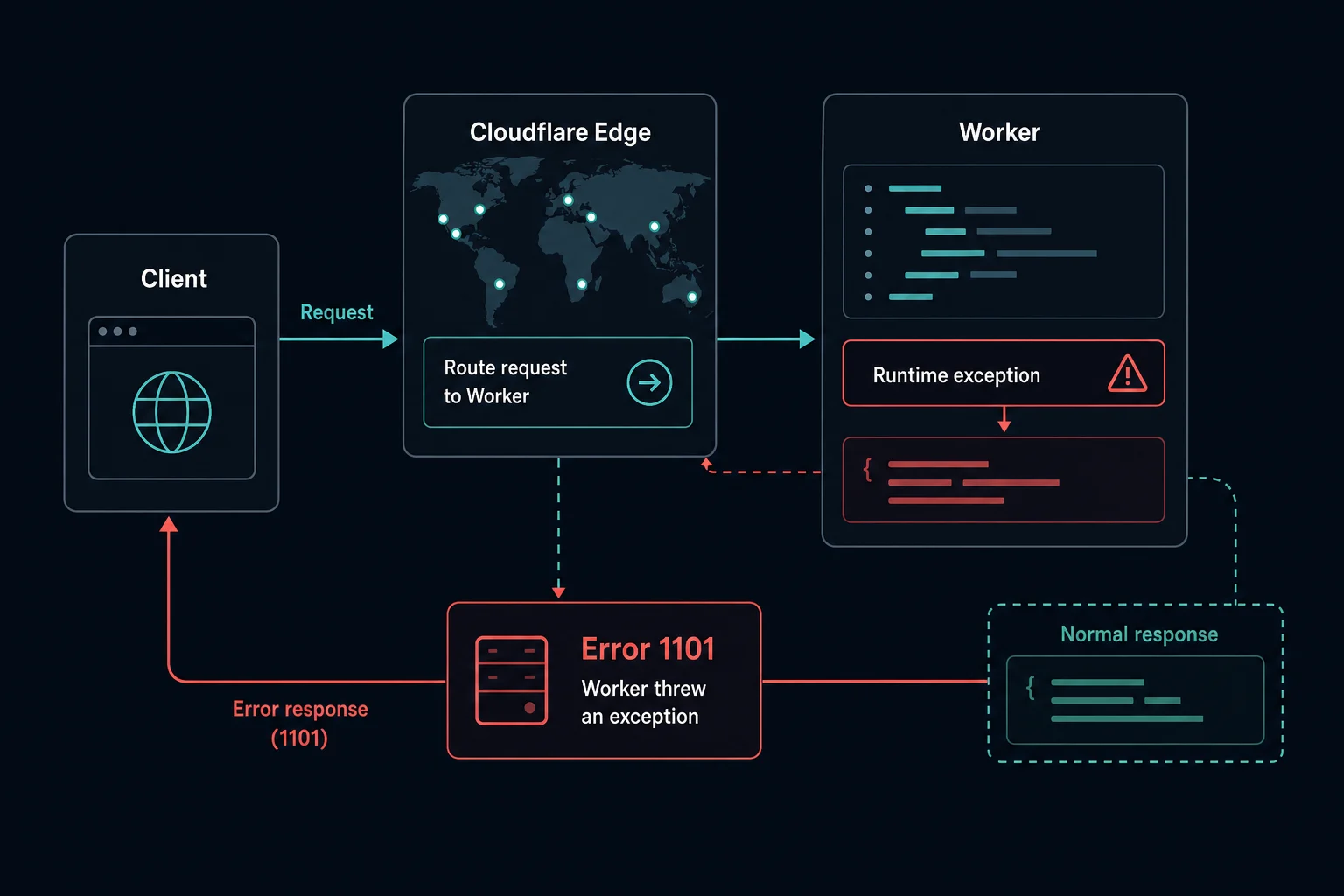
Cloudflare Error 1101 is a runtime error generated by Cloudflare Workers. It means the request reached Cloudflare and was routed to Worker code, but the Worker failed before producing a valid response.
The request path usually looks like this:
- A visitor requests a URL routed through a Worker.
- Cloudflare invokes the Worker at the edge.
- The Worker runs the matching code path.
- The code throws, rejects, gets stuck, or finishes without a response.
- Cloudflare returns Error 1101.
That makes 1101 different from normal origin downtime. The failing layer is the Worker runtime or Worker code path.
Error 1101 vs. 1102, 520, 1033, and 1005
Use the exact code to avoid debugging the wrong layer.
| Error | Meaning | First place to check |
|---|---|---|
| Error 1101 | Worker threw an exception or did not return a response | Worker logs, code paths, bindings, and deploys |
| Error 1102 | Worker exceeded CPU or memory limits | Worker resource usage, loops, heavy parsing, and limits |
| Cloudflare Error 520 | Origin returned an unknown or invalid response | Origin logs, reverse proxies, malformed headers |
| Cloudflare Error 1033 | Cloudflare Tunnel has no healthy connector | Tunnel status and cloudflared logs |
| Cloudflare Error 1005 | ASN banned | Cloudflare access rules and Security Events |
If a Worker throws while fetching an origin, the page can look like a site failure. Check the Worker logs first. If the request never reaches a Worker, then compare with access errors like Cloudflare Error 1020 or server-side errors like Cloudflare Error 522.
Why Cloudflare Error 1101 Happens
Common causes include:
- An uncaught JavaScript exception.
- A rejected promise that is not handled.
- A code path that never returns a
Response. - A promise that never resolves or rejects.
- JSON parsing or request body parsing errors.
- Missing environment variables, secrets, KV, R2, D1, Durable Object, or service bindings.
- A failing
fetch()call that is not caught. - A Worker route that sends unexpected input to code that assumes a different shape.
- WebSocket handling that does not close the server-side connection correctly.
- A recent deploy changed module syntax, compatibility flags, or runtime behavior.
The most useful question is: which request path throws, and what changed before the first 1101 spike?
How to Fix Error 1101 as a Visitor
Visitors can only do basic checks:
- Refresh once.
- Try again later.
- Contact the site owner with the URL, timestamp, and screenshot.
Changing proxies, clearing cookies, or switching browsers usually will not fix a true Error 1101. The website owner needs to fix the Worker code or deployment.
How to Debug Error 1101 as a Developer
Start with evidence from the failing request.
Check:
- Worker logs with
wrangler tail. - Recent deploys and route changes.
- Whether the error affects every route or only one path.
- Whether the failing request includes unexpected headers, query params, body shape, or method.
- Missing or renamed bindings in the Worker environment.
- Unhandled promise rejections around
fetch(), storage, queues, or API calls. - Every branch returns a
Response. - Whether WebSocket, streaming, or long-running code leaves the runtime without a response.
If the failure started after a deploy, roll back or compare the diff before tuning infrastructure. Error 1101 usually points to code behavior, not origin capacity.
Common Fixes for Worker Threw Exception
Practical fixes include:
- Wrap risky parsing and upstream calls in
tryandcatch. - Return structured error responses instead of letting exceptions escape.
- Validate input before reading nested properties.
- Check
request.methodbefore parsing a body. - Confirm environment bindings exist in every deployed environment.
- Add timeouts or fallback responses around upstream
fetch()calls. - Return a
Responsefrom every handler branch. - Avoid promises that can wait forever.
- Test Worker routes with production-like headers and methods.
- Add monitoring around 1101 rates after deploys.
Keep fixes narrow. If one route throws on a missing query parameter, fix that route's validation instead of rewriting unrelated Worker logic.
Can Proxies Fix Cloudflare Error 1101?
Usually, no. Error 1101 is a Worker runtime or code failure. Proxy rotation does not fix JavaScript exceptions, missing bindings, unresolved promises, or Worker routes that fail to return a response.
If your automation sees 1101 while monitoring a target, treat it as target-side application instability. Slow retries and log the error separately. For access-denied issues where proxy quality might matter, compare Error 1005, Error 1020, and HTTP 403 Forbidden.
How to Prevent Error 1101
For Worker-backed routes:
- Add tests for every route branch.
- Validate request inputs before use.
- Keep environment bindings consistent across preview, staging, and production.
- Return explicit responses for errors.
- Catch and log upstream failures.
- Use
wrangler tailor Workers observability during deploy validation. - Monitor error rates after releases.
- Keep long-running, streaming, and WebSocket code paths covered by integration tests.
The goal is not to hide exceptions. It is to make failure modes observable and return controlled responses where possible.
FAQ
What does Cloudflare Error 1101 mean?
Cloudflare Error 1101 means a Cloudflare Worker threw a JavaScript exception or failed to produce a response.
Is Error 1101 caused by my browser?
Usually, no. Your request reached Cloudflare, but Worker code failed at the edge.
What does "Worker threw exception" mean?
It means the Worker runtime hit an uncaught error, rejected promise, missing binding, invalid input path, or another runtime failure while handling the request.
How do I find the cause of Error 1101?
Reproduce the request and inspect Worker logs with wrangler tail or Cloudflare Workers observability. Compare the failing route against recent deploys.
Is Error 1101 the same as Error 1102?
No. Error 1101 is a Worker exception or no-response problem. Error 1102 means the Worker exceeded resource limits such as CPU or memory.
Final Thoughts
Cloudflare Error 1101 means a Worker threw an exception or failed to return a valid response. Visitors can report the URL and time, but developers should inspect Worker logs, recent deploys, route-specific inputs, bindings, promises, and return paths.
For nearby debugging paths, compare this with Cloudflare Error 1033 for tunnel connector issues, Cloudflare Error 520 for unexpected origin responses, and Cloudflare Error 1005 for ASN-based access denial.
Technical references: Cloudflare Workers errors and exceptions and Cloudflare error diagnostic headers.