HTTP 403 Forbidden means the server understood your request but refused to allow access. The site is reachable, the URL may exist, and the request was valid enough to evaluate, but the server, application, CDN, WAF, or access policy decided you are not allowed to continue.
For normal visitors, a 403 can be caused by missing permissions, a private page, a blocked IP, a VPN, a browser extension, or a security rule. For scraping, monitoring, sneaker bots, retail automation, or API clients, it usually means the request looks unauthorized, blocked, or outside the target site's allowed access policy.
The fix depends on where the denial happens. You may need to log in, request access, fix headers or tokens, adjust server permissions, slow down, or use cleaner proxy infrastructure when legitimate traffic is being grouped with blocked networks.
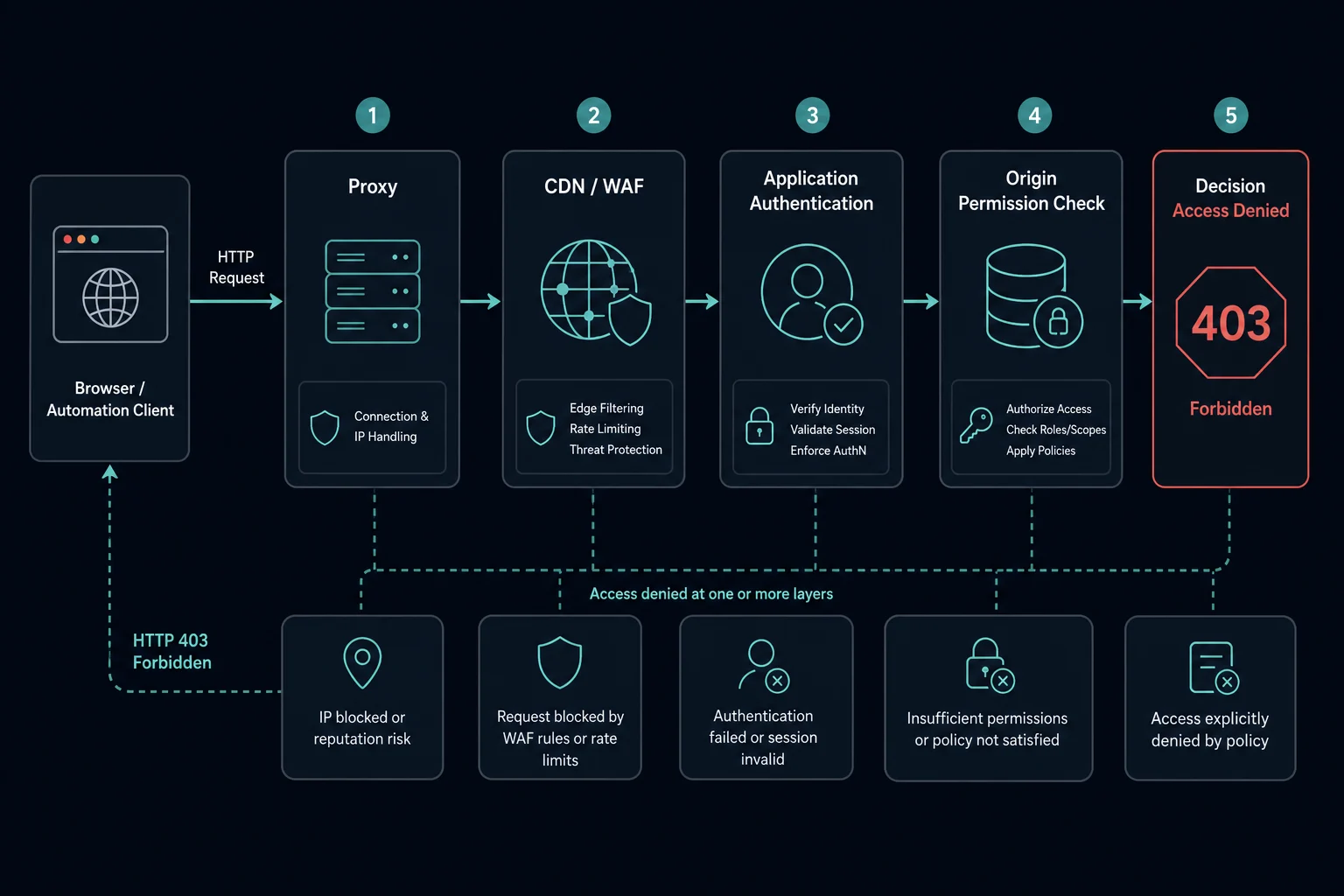
Quick Answer: How to Fix HTTP 403 Forbidden
Start with the cause that matches your situation:
| Situation | Best first step |
|---|---|
| You are a normal visitor | Refresh once, log in, clear site cookies, disable VPNs or privacy extensions, and try another network |
| You own the website | Check file permissions, auth rules, WAF events, CDN rules, hotlink protection, and server logs |
| You are calling an API | Verify the token, scope, account role, request method, origin, and IP allowlist |
| You are running a scraper | Confirm the target allows your use case, then debug auth, headers, sessions, rate, and IP quality |
| Only proxy traffic gets 403 | Test the same request locally, then compare proxy ASN, region, reputation, and request pattern |
| Every request gets 403 | Treat it as a policy, authentication, permission, or WAF issue before adding more proxies |
MDN describes 403 Forbidden as a client error where the server understands the request but refuses to process it. RFC 9110 defines the same core behavior for the HTTP specification.
What Is HTTP 403 Forbidden?
HTTP 403 Forbidden is a standard HTTP status code in the 4xx client-error class. It means the server received the request and understood it, but access is forbidden.
A browser, scraper, API client, or bot may show it as:
403 ForbiddenHTTP 403Access deniedYou don't have permission to access this resource- A custom WAF, CDN, or security page
- A JSON API response with an authorization error
The important point is that 403 is not the same as a network timeout or server outage. If Cloudflare cannot connect to the origin, compare it with Cloudflare Error 522. If the origin refuses the connection or is down, compare it with Cloudflare Error 521. With 403, the request reached a system that could make an access decision.
HTTP 403 vs. 401 vs. 429 vs. 1020
Different access and rate errors point to different fixes.
| Code or error | Meaning | Best first diagnosis |
|---|---|---|
| HTTP 401 | Authentication required or invalid | Check login, token, API key, or credential format |
| HTTP 403 | Access is forbidden | Check permissions, policy, WAF, IP rules, and auth scopes |
| HTTP 429 | Too many requests | Reduce rate, add backoff, and lower concurrency |
| Cloudflare 1015 | Cloudflare rate limit triggered | Fix request pacing and per-IP request concentration |
| Cloudflare 1005 | ASN banned by the site owner | Check Cloudflare IP Access Rules and the visitor's network |
| Cloudflare 1020 | Cloudflare firewall rule denied access | Check WAF rules, request profile, location, and IP reputation |
If the user is not authenticated, the right response is often 401. If the user is authenticated but does not have permission, 403 usually fits. If the request volume is too high, treat it as an HTTP 429 Too Many Requests rate-limit problem: reduce rate, add backoff, and lower concurrency.
Cloudflare-branded blocks can overlap with 403 behavior. For Cloudflare rate limits, read Cloudflare Error 1015. For ASN-based access denied pages, read Cloudflare Error 1005. For access denied by a Cloudflare firewall rule, read Cloudflare Error 1020.
Why HTTP 403 Happens
HTTP 403 happens when a server-side access decision refuses the request. That decision can come from the origin application, web server, CDN, WAF, API gateway, framework middleware, or a proxy/security layer in front of the origin.
Common causes include:
- The page requires a logged-in account.
- The account does not have the right role or subscription.
- The API token is valid but lacks the required scope.
- The request comes from a blocked IP, ASN, region, VPN, or proxy network.
- A WAF rule flagged the request.
- The server denies directory browsing.
- File or folder permissions are wrong.
- Hotlink protection blocks the request origin or referrer.
- CSRF, CORS, or origin checks fail.
- Headers, cookies, or sessions are missing or inconsistent.
- The endpoint intentionally blocks automated clients.
- Rate or abuse controls return 403 instead of 429.
For proxy and scraping workflows, the usual mistake is treating every 403 as an IP problem. IP reputation matters, but a bad token, missing cookie, wrong method, blocked endpoint, inconsistent browser profile, or forbidden use case can produce the same status.
How to Fix HTTP 403 as a Website Visitor
If you are browsing normally, start with simple checks:
- Refresh the page once.
- Confirm the URL is correct.
- Log in or switch to the account that has access.
- Clear cookies for the site and try again.
- Disable VPNs, public proxies, privacy extensions, or request-modifying extensions.
- Try another browser or device.
- Try another network if you are on school, work, mobile carrier, or shared Wi-Fi.
- Contact the site owner if you believe you should have access.
Do not keep refreshing aggressively. If the 403 is tied to abuse controls, repeated retries can make your session or IP look worse.
How to Fix HTTP 403 as a Website Owner
If your own site is returning 403, identify which layer generated the response before changing rules.
Check:
- Web server logs for the blocked path and status.
- Application logs for auth, role, subscription, or permission failures.
- CDN and WAF security events.
- File and folder permissions on the origin server.
- Directory index settings.
- Hotlink protection, referrer rules, and origin checks.
- IP, country, ASN, and bot-management rules.
- API gateway policies and token scopes.
- Recent deploys that changed middleware, routes, or access rules.
For static files, a 403 often points to permissions, missing index files, or directory listing being disabled. For apps and APIs, it more often points to auth, account state, role checks, subscription status, or a security rule.
Make narrow changes. If a WAF rule blocks real users, adjust that rule or add a scoped exception for the path and signal involved. Avoid disabling the whole security layer just because one route is misconfigured.
How to Fix HTTP 403 for APIs
For APIs, 403 usually means "we know who you are, but you cannot do this action." That is different from a missing or invalid token.
Verify:
- The token is attached in the expected header.
- The token has not expired.
- The account has access to the resource.
- The token includes the required scopes.
- The request uses the allowed method.
- The account, workspace, project, or organization ID is correct.
- The API allows your IP, region, or environment.
- The endpoint is available on your plan.
- The request body matches the permission model.
If the API returns a structured error body, log it. The text around the 403 often tells you whether the issue is a role, plan limit, missing scope, IP allowlist, or policy denial.
How to Fix HTTP 403 When Scraping
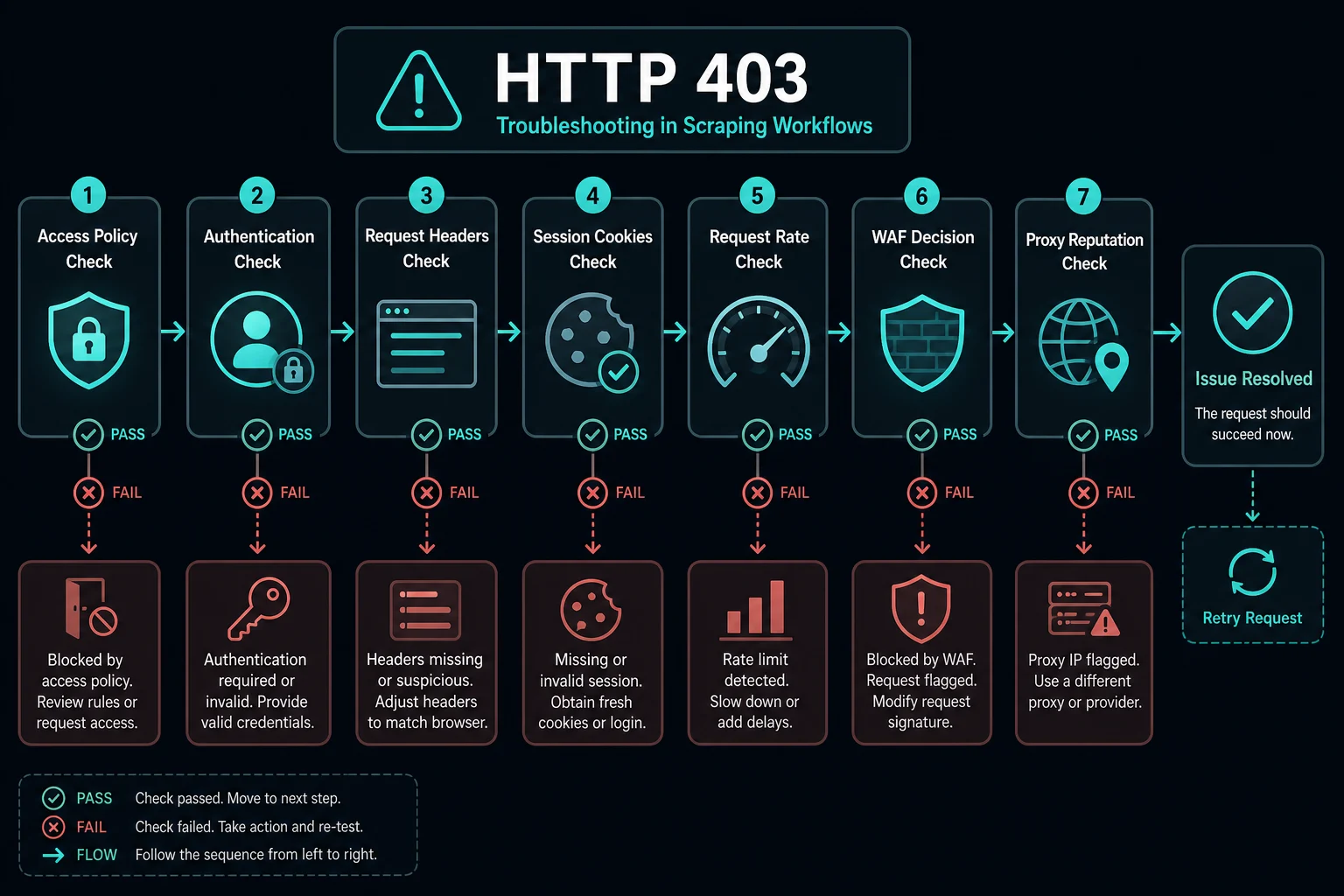
For scraping and automation, treat 403 as a signal to debug responsibly before rotating harder.
Start with these checks:
- Confirm the target permits your use case and that you are following applicable terms and legal boundaries.
- Compare the failing request against a normal browser request.
- Check whether the URL requires login or a paid account.
- Preserve cookies and sessions when the workflow expects continuity.
- Keep headers internally consistent with the client you are using.
- Avoid switching user agents, languages, and TLS/browser profiles inside one session.
- Reduce request rate and add jitter.
- Back off after 403, 429, 1015, or 1020 responses.
- Separate public page monitoring from login, cart, checkout, and account endpoints.
- Log blocks by proxy, endpoint, method, user agent, region, and session.
If the same request succeeds from your local browser but fails only through a proxy pool, IP reputation, region, ASN, or proxy quality may be involved. If it fails everywhere, fix the request, auth, session, or access-policy issue first.
When Proxies Help With HTTP 403
Proxies help with HTTP 403 when the denial is tied to IP-based signals. That can include blocked IP reputation, flagged datacenter ranges, overused public proxies, country restrictions, ASN rules, or too many legitimate requests coming from the same address.
Use Unknown Proxies residential and ISP plans when your current proxy setup is causing false positives or concentrating legitimate traffic on poor-quality IPs.
Residential proxies are useful for rotating access, geo-testing, search result checks, ad verification, and workflows that need consumer-like networks. ISP proxies are useful for stable sessions, account workflows, retail monitoring, and lower-latency repeated access. If you need to reformat proxy lists between tools, use the proxy converter before loading them into your scraper or bot.
Proxies do not fix missing permissions. If the endpoint requires an account, a paid plan, a valid token, or explicit consent, changing IPs will not solve the access problem.
Residential vs. ISP Proxies for 403 Errors
Choose proxy type based on the source of the denial:
| Proxy type | Best for | Why it can help with 403 |
|---|---|---|
| Residential proxies | Rotating scraping, geo testing, ad checks, location-sensitive access | Uses consumer-style IPs and broader location diversity |
| ISP proxies | Stable sessions, retail monitoring, account workflows, lower latency | Keeps cleaner dedicated IPs with consistent sessions |
| Datacenter proxies | Permissive targets and high-speed low-cost requests | Fast, but often easier for strict sites to classify |
If you are not sure, run a controlled test. Keep URL, headers, cookies, rate, and client behavior the same. Change only the proxy pool. That makes it easier to tell whether the 403 is caused by IP quality or by the request itself.
How to Prevent HTTP 403 in Automation Workflows
Prevention is mostly about making requests authorized, consistent, and allowed.
Use these practices:
- Authenticate only where you are permitted to authenticate.
- Keep sessions sticky for workflows that expect a continuous user session.
- Avoid retry storms after access errors.
- Use conservative concurrency per proxy.
- Add jitter around request intervals.
- Respect robots guidance, site terms, API rules, and account permissions.
- Monitor 403 rates by endpoint and proxy pool.
- Separate high-risk endpoints from public pages.
- Remove blocked or low-performing proxies from rotation.
- Keep proxy formats clean before importing them into tools.
For monitoring workflows, use the Unknown Proxies delay calculator to estimate request pacing before scaling tasks. The goal is to avoid concentrating too much traffic on one IP or subnet, which can turn access troubleshooting into a separate HTTP 429 rate-limit problem.
FAQ
What does HTTP 403 Forbidden mean?
HTTP 403 Forbidden means the server understood the request but refused access. The denial may come from the app, server, CDN, WAF, API gateway, or an access-control rule.
Is HTTP 403 the same as access denied?
Usually, yes. Many websites display "access denied" when they return a 403, although some CDNs and WAFs show branded pages instead of a plain HTTP error.
Is 403 a client error or server error?
403 is a 4xx client-error status code. That does not always mean the user did something wrong. It means the server evaluated the request as unauthorized or forbidden from the perspective of access policy.
How do I fix 403 Forbidden in Chrome?
Log in if access is required, clear site cookies, disable VPNs or request-modifying extensions, try another browser, and contact the site owner if your account should have access.
Can proxies fix HTTP 403?
Proxies can help when the 403 is tied to IP reputation, location, ASN, or request concentration. They do not fix invalid credentials, missing permissions, forbidden endpoints, or site policies that disallow your use case.
Why do I get 403 only when using a proxy?
The proxy IP, ASN, region, or network reputation may be blocked. It can also happen if your proxy tool changes headers, sessions, TLS behavior, or request order compared with your normal browser.
Should I retry after a 403?
Not immediately in a tight loop. First identify whether the 403 is caused by permissions, authentication, WAF rules, or IP reputation. Repeated retries can make rate and abuse systems more likely to block you.
Final Thoughts
HTTP 403 Forbidden means access is denied even though the server understood the request. Visitors should check login state, cookies, extensions, VPNs, and network issues. Site owners should inspect auth rules, server permissions, CDN settings, WAF events, and logs. Scraper and automation operators should debug access policy, sessions, headers, rate, and proxy quality before scaling retries.
If HTTP 403 is happening because legitimate requests are concentrated on blocked or low-quality IPs, compare Unknown Proxies plans and choose residential or ISP proxies based on whether you need rotation, location diversity, or stable sessions.
Technical references: MDN HTTP 403 Forbidden and RFC 9110 Section 15.5.4.