HTTP 429 Too Many Requests means a server, API, CDN, WAF, or proxy layer received more requests than it is willing to accept from your client in a given time period.
For normal visitors, HTTP 429 can happen after refreshing too quickly, opening many pages at once, or using a shared network that many other users are also using. For scraping, monitoring, sneaker bots, ticketing tools, retail automation, and API clients, it usually means request volume is too concentrated, retry logic is too aggressive, or too many tasks are running through the same identity.
The fix is not always "add more proxies." A clean proxy pool can help when the rate limit is tied to one IP address, subnet, ASN, or region. But if your scraper sends a tight retry loop, ignores Retry-After, recreates sessions, or hammers a sensitive endpoint, more IPs will only spread the same bad pattern across more addresses.
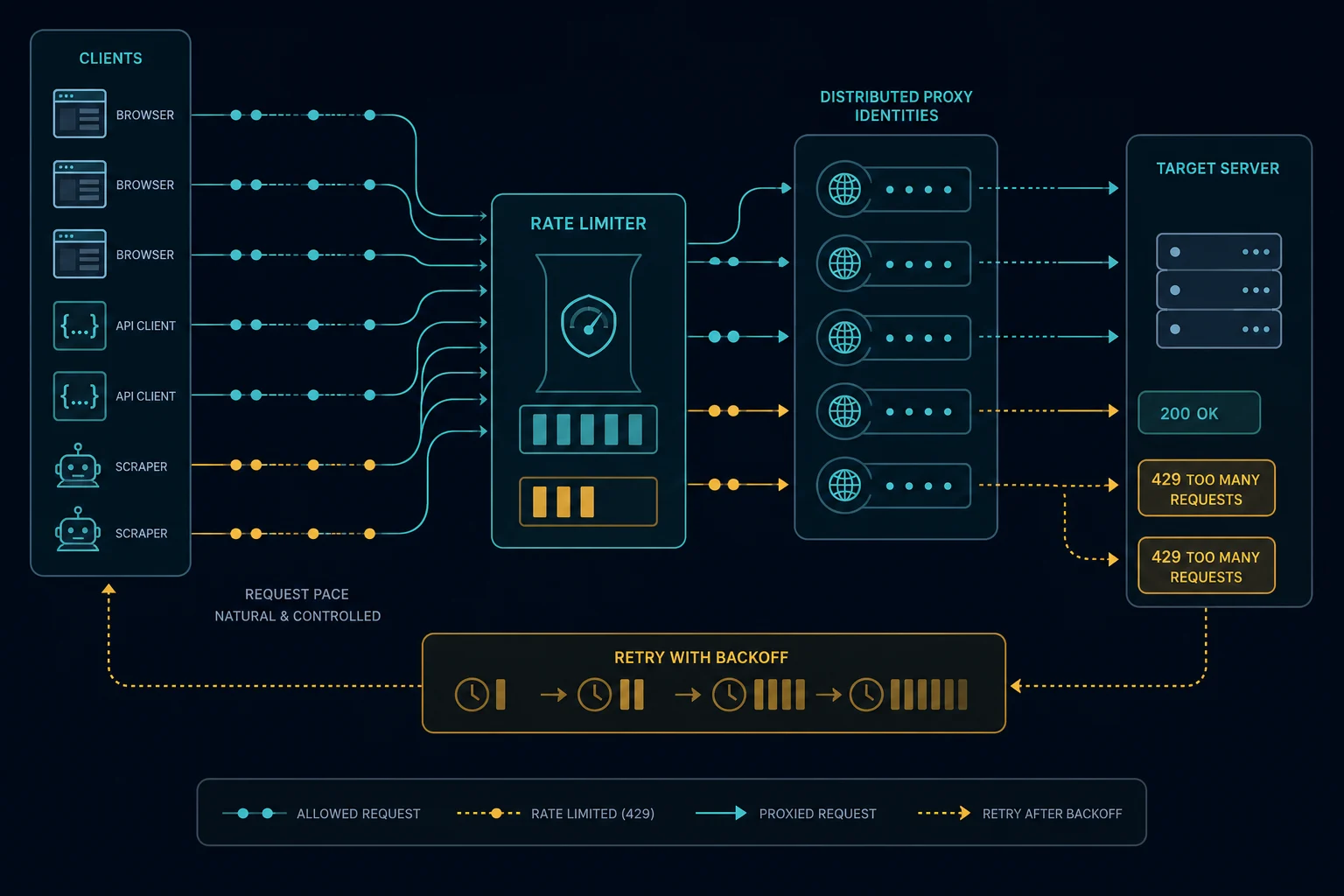
Quick Answer: How to Fix HTTP 429
Start with the situation that matches your workflow:
| Situation | Best first step |
|---|---|
| You are a normal visitor | Stop refreshing, wait before retrying, clear cookies, and try another network if needed |
| You are calling an API | Read the rate-limit headers, respect Retry-After, reduce concurrency, and cache responses |
| You are running a scraper | Lower requests per second per IP, add jitter, preserve sessions, and back off after 429 |
| One IP keeps getting 429 | Spread legitimate traffic across cleaner residential or ISP proxies and reduce per-IP pressure |
| Every proxy gets 429 | Fix request timing, endpoint selection, sessions, and retry behavior before scaling the pool |
| You own the website | Tune thresholds, add useful rate-limit headers, and separate strict endpoints from public pages |
The fastest debugging rule is simple: if a slower run succeeds, you have a pacing problem. If the same request fails even at low volume, look at authentication, endpoint policy, session state, IP reputation, or a related access error such as HTTP 403 Forbidden.
What Is HTTP 429 Too Many Requests?
HTTP 429 is a standard 4xx client-error status code for rate limiting. It means the request was understood, but the client has sent too many requests in a configured period.
A 429 response may appear as:
429 Too Many RequestsHTTP 429Rate limit exceededToo many attemptsYou are being rate limited- A JSON API error with quota or throttle details
- A CDN or WAF-branded rate-limit page
The system returning 429 may be the origin app, API gateway, CDN, reverse proxy, load balancer, WAF, bot-management layer, or an upstream provider. That matters because the right fix depends on where the limit is enforced.
HTTP 429 vs. Cloudflare Error 1015 vs. HTTP 403
HTTP 429, Cloudflare Error 1015, and HTTP 403 can all show up during scraping and automation, but they point to different diagnoses.
| Error | Meaning | Best first diagnosis |
|---|---|---|
| HTTP 429 | Too many requests | Reduce rate, add backoff, respect Retry-After, and lower concurrency |
| Cloudflare Error 1015 | Cloudflare rate limit triggered | Fix request pacing and per-IP request concentration |
| HTTP 403 Forbidden | Access is forbidden | Check auth, permissions, WAF rules, IP reputation, and endpoint policy |
| Cloudflare 1020 | Firewall rule denied access | Check Cloudflare security rules, location, ASN, request profile, and IP quality |
If you see 429, start with rate and retry behavior. If you see 403, do not assume the problem is only speed. A 403 may be permissions, WAF policy, missing session state, or blocked IP reputation.
Why HTTP 429 Happens
HTTP 429 happens when the receiving system counts too many requests from the same identity. The identity can be more than just an IP address.
Common rate-limit keys include:
- IP address
- IP subnet
- ASN or network
- Account ID
- API key
- Session cookie
- Device or browser fingerprint
- User agent
- Country or region
- Request path
- Endpoint group
- HTTP method
- Login, search, cart, checkout, or password-reset action
For scraping and automation, the most common causes are concentrated volume and retry storms. A scraper may look reasonable when one task runs, then immediately trip 429 when 200 workers hit the same path through the same few IPs.
Common 429 Triggers in Scraping
Look for these patterns first:
- Too many concurrent tasks per proxy
- Fixed request intervals without jitter
- Immediate retries after 429, 403, 1015, or timeout responses
- No global queue across workers
- New sessions created for every request
- Search, login, cart, checkout, or API endpoints treated like public pages
- Monitoring too many SKUs from one proxy
- Using one API key across too many jobs
- Ignoring
Retry-Afterheaders - Rotating proxies while keeping the same noisy behavior
- Running all workers at the same scheduled second
If the block rate rises quickly after a deploy, rollback, config change, or task-count increase, compare requests per second per identity before and after the change. That usually finds the cause faster than swapping providers.
How to Fix HTTP 429 as a Website Visitor
If you are browsing normally, use simple recovery steps:
- Stop refreshing the page.
- Wait before trying again.
- Close duplicate tabs for the same site.
- Clear cookies for the domain if the issue persists.
- Disable auto-refresh extensions.
- Turn off VPNs or free public proxies.
- Try a different network if your current IP is shared by many users.
- Contact the site owner if you are still blocked.
Do not keep retrying every few seconds. Repeated attempts can keep you inside the rate-limit window and extend the practical block time.
How to Fix HTTP 429 for APIs
For APIs, start with the response headers and documentation. Many APIs return headers that explain the limit.
Look for:
Retry-AfterX-RateLimit-LimitX-RateLimit-RemainingX-RateLimit-ResetRateLimit-LimitRateLimit-RemainingRateLimit-Reset
Then adjust the client:
- Respect
Retry-Afterexactly when it is present. - Use exponential backoff with jitter.
- Cap concurrent requests per API key.
- Cache repeated reads.
- Batch requests when the API supports it.
- Avoid polling unchanged resources too often.
- Use webhooks instead of polling when available.
- Separate user-triggered requests from background jobs.
- Do not retry non-idempotent requests blindly.
If the API limit is account-based, proxies will not fix it. You need lower volume, better caching, a higher plan, or a different integration pattern.
How to Fix HTTP 429 When Scraping
For scraping and monitoring, slow down before scaling out.
Start with these controls:
- Set a maximum requests-per-second value per proxy.
- Limit concurrent tasks per proxy.
- Add random jitter around delays.
- Back off after every 429.
- Stop retrying the same blocked URL immediately.
- Reuse cookies and sessions where the workflow expects continuity.
- Keep headers and browser behavior consistent inside a session.
- Split high-risk endpoints into a slower queue.
- Log 429s by proxy, URL, endpoint type, user agent, session, and task.
- Respect site terms, robots guidance, and applicable legal boundaries.
For monitoring workflows, use the Unknown Proxies delay calculator to estimate how many proxies you need for a given number of tasks and delay. If your delay is too low for the size of your proxy list, 429s are expected.
How to Size Proxy Count for 429 Errors
The practical question is not just "how many proxies do I need?" It is "how many requests will each identity make per minute?"
Use this rough process:
- Count how many URLs, SKUs, pages, or API resources you monitor.
- Choose a delay that the target can tolerate.
- Estimate requests per minute per proxy.
- Add headroom for retries, redirects, login refreshes, and failed sessions.
- Lower concurrency until 429s stop rising.
- Increase slowly and watch block rate by endpoint.
If you are using bandwidth-priced residential proxies, also account for page weight. Heavy pages, images, scripts, and browser sessions consume much more data than lightweight API responses. Use the residential proxy pages to see how purchased data works: residential proxies.
When Proxies Help With HTTP 429
Proxies help when the rate limit is tied to IP-based identity or when legitimate traffic is too concentrated on one network.
Use Unknown Proxies residential and ISP plans when:
- One IP or subnet is carrying too many requests.
- Your current proxy pool is overused or heavily flagged.
- You need to distribute monitoring across cleaner IPs.
- You need geo-targeted access without stacking all tasks on one address.
- You need stable sessions for account or retail workflows.
Residential proxies are useful for rotating traffic, location diversity, and browser-like workflows. ISP proxies are useful for stable sessions, lower latency, and repeated monitoring from dedicated IPs.
The important part is pacing. Better proxies make it easier to distribute legitimate traffic, but they do not make unlimited request rates safe.
Residential vs. ISP Proxies for 429
Choose proxy type based on the job:
| Proxy type | Best for | Why it helps with 429 |
|---|---|---|
| Residential proxies | Rotating scraping, geo testing, search checks, ad verification | Spreads traffic across consumer-style IPs and regions |
| ISP proxies | Retail monitoring, account sessions, faster repeated workflows | Keeps stable dedicated IPs with lower latency |
| Datacenter proxies | Permissive sites and cheap high-speed requests | Fast, but often easier to rate limit or classify |
If you are monitoring products, tickets, or restocks, ISP proxies often fit because stable sessions and speed matter. If you need broad rotation or location diversity, residential proxies usually fit better.
Compare plans on pricing, or go straight to purchase proxies when you already know the proxy type and quantity you need.
How to Prevent HTTP 429
Prevention is mostly queue design.
Use these practices:
- Put every worker behind a shared rate limiter.
- Track limits per proxy, account, API key, and endpoint.
- Add jitter to every repeated job.
- Avoid synchronized starts at the top of the minute.
- Use exponential backoff after rate-limit responses.
- Honor
Retry-Afterand reset headers. - Cache pages and API responses when possible.
- Separate sensitive endpoints from public pages.
- Reduce retries during incident spikes.
- Remove low-performing proxies from rotation instead of retrying harder.
For bots and scrapers, watch block rate as a metric. If 429s rise, reducing concurrency is usually cheaper than burning more sessions, accounts, or proxy bandwidth.
FAQ
What does HTTP 429 Too Many Requests mean?
HTTP 429 means the client sent too many requests in a configured time period. The limit may be based on IP, account, API key, session, endpoint, or another identity signal.
How long does HTTP 429 last?
It depends on the server's rate-limit configuration. Check for a Retry-After or reset header. If no header is present, wait and retry conservatively instead of looping.
Is HTTP 429 the same as Cloudflare Error 1015?
They are related. HTTP 429 is the standard rate-limit status code. Cloudflare Error 1015 is Cloudflare's branded rate-limit page for Cloudflare-managed rules.
Can proxies fix HTTP 429?
Proxies can help when the limit is IP-based or when too much legitimate traffic is coming from one network. They will not fix account-based API limits, bad retry logic, or endpoints that disallow your use case.
Should I rotate proxies after a 429?
Back off first. If you immediately rotate and repeat the same request pattern, you can trigger more blocks. Rotate carefully only after lowering per-IP volume and respecting cooldowns.
Why do I get 429 even with proxies?
Your per-proxy request rate may still be too high, your sessions may be inconsistent, or the target may rate limit by account, cookie, API key, browser fingerprint, endpoint, or behavior instead of only by IP.
Final Thoughts
HTTP 429 Too Many Requests is a rate-limit signal. For visitors, the fix is usually to wait and stop refreshing. For API clients, the fix is to respect headers, back off, cache, and reduce concurrency. For scrapers and automation operators, the fix is disciplined pacing: lower per-IP volume, add jitter, preserve sessions, and avoid retry storms.
If the 429s are caused by too much traffic from the same IPs, compare Unknown Proxies plans, use the delay calculator to size your proxy list, and choose residential or ISP proxies based on whether your workflow needs rotation or stable sessions.
Technical references: MDN HTTP 429 Too Many Requests and RFC 6585 Section 4.