Cloudflare Error 523 means Cloudflare cannot reach the origin web server at the network route or address level.
For visitors, Error 523 usually means the website owner, host, or network provider needs to fix an origin reachability issue. Refreshing may help if the route recovers quickly, but there is usually nothing meaningful to change in your browser.
For website owners, Error 523 is a Cloudflare 52x origin error. Cloudflare has a configured origin address, but the network path to that origin is unreachable, misrouted, or pointing somewhere that cannot be contacted.
Quick Answer: How to Fix Cloudflare Error 523
Start with the role that matches you:
| Situation | Best first step |
|---|---|
| You are a visitor | Refresh once, wait, and contact the site owner if it continues |
| You own the site | Confirm Cloudflare DNS points to the correct origin IP address |
| DNS changed recently | Check A and AAAA records for stale, private, or wrong addresses |
| Hosting changed recently | Verify routing from Cloudflare to the new host with the provider |
| AWS routing is involved | Review broad VPC route table entries that may capture Cloudflare IP ranges |
| Similar errors appear | Compare 523 with 521 and 522 before changing app settings |
Error 523 is different from Cloudflare Error 521, where the origin refuses the connection, and Cloudflare Error 522, where the connection attempt times out. With 523, Cloudflare cannot route to the origin successfully.
What Is Cloudflare Error 523?
Cloudflare Error 523 is an origin reachability error. It appears when Cloudflare cannot contact the origin web server because the route, DNS target, or network path is not reachable.
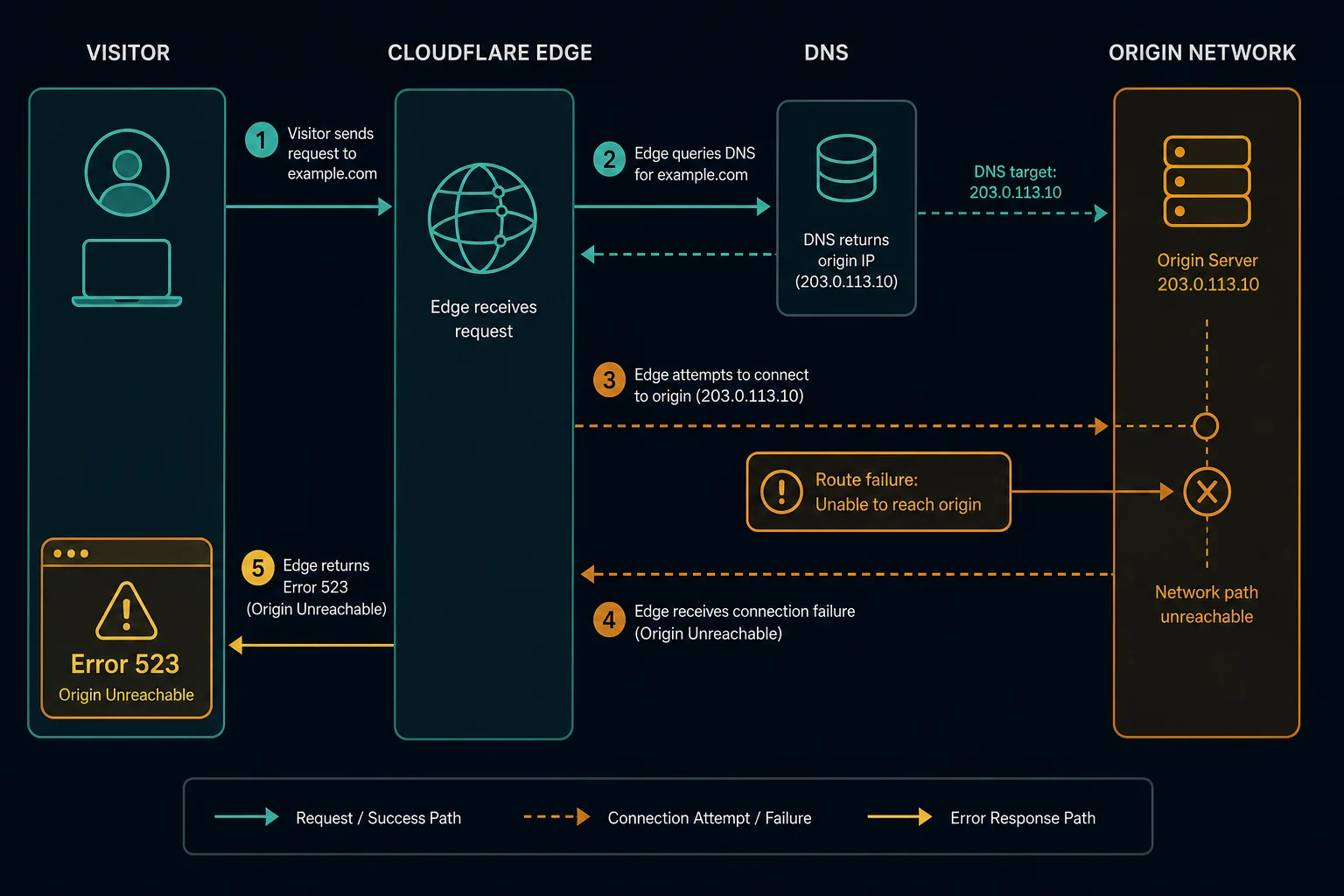
The request path usually looks like this:
- A visitor requests a Cloudflare-protected website.
- Cloudflare receives the request at the edge.
- Cloudflare checks the configured DNS record for the origin.
- Cloudflare tries to route traffic to that origin address.
- The origin cannot be reached through the network path.
- Cloudflare returns Error 523.
That means Cloudflare is reachable from the visitor's side, but Cloudflare cannot reach the origin address it is supposed to contact.
Cloudflare Error 523 vs. 521 and 522
Cloudflare 521, 522, and 523 all involve the origin, but they point to different connection states.
| Error | Meaning | First place to check |
|---|---|---|
| 521 | Web server is down | Origin service, refused connections, closed port, firewall rejects |
| 522 | Connection timed out | Firewall drops, overload, slow connection setup, network path |
| 523 | Origin is unreachable | DNS target, route table, origin IP, host network reachability |
With 521, Cloudflare reaches something that refuses or cannot accept the connection. With 522, Cloudflare waits for the connection but it does not complete in time. With 523, Cloudflare cannot reach the origin through the route it has.
That distinction keeps debugging focused. Restarting Nginx may fix 521, but it will not fix a wrong DNS record or host route that causes 523.
If the hostname is backed by Cloudflare Tunnel, also compare the symptoms with Cloudflare Error 1033. A tunnel with no healthy cloudflared connector is different from a public origin route that Cloudflare cannot reach.
Cloudflare 52x Origin Error Overview
Use the exact 52x code to isolate the layer that failed.
| Error | Meaning | First place to check |
|---|---|---|
| 520 | Web server returned an unknown error | Origin logs, crashes, malformed responses, headers |
| 521 | Web server is down | Origin service, refused connections, firewall blocks |
| 522 | Connection timed out | Origin reachability, network path, firewalls, overload |
| 523 | Origin is unreachable | DNS, routing, origin IP, network reachability |
| 524 | A timeout occurred | Slow origin response after a connection was made |
| 525 | SSL handshake failed | TLS handshake, certificate chain, cipher support |
| 526 | Invalid SSL certificate | Origin certificate validity in Full strict mode |
If the failure is about route or address reachability, start with 523. If the route works but the origin refuses or drops the connection, move to 521 or 522.
Why Cloudflare Error 523 Happens
Common causes include:
- Cloudflare DNS points to the wrong origin IP address.
- The origin IP was changed during a migration but DNS was not updated.
- An A or AAAA record points to an unreachable address.
- A private, internal, or decommissioned IP is configured by mistake.
- The hosting provider has a routing issue.
- A firewall, router, or network device has no route back to Cloudflare.
- IPv6 records point to an origin that is not reachable over IPv6.
- A load balancer address changed or lost its public route.
- A cloud route table sends Cloudflare traffic toward the wrong destination.
- An AWS VPC route table captures Cloudflare public ranges through an overly broad route.
The practical pattern is usually DNS or routing. If a migration happened recently, check records first. If nothing changed in Cloudflare, ask the host to verify routing and traceroute/MTR data between the origin network and Cloudflare.
How to Fix Error 523 as a Visitor
Visitors can only do basic checks:
- Refresh the page once.
- Wait a few minutes.
- Try another browser or network if you want to rule out a local issue.
- Contact the website owner with the URL and timestamp.
Error 523 is not usually caused by browser cookies, proxy settings, or user-agent headers. It is an origin reachability problem behind Cloudflare.
How to Fix Error 523 as a Website Owner
Start with DNS and origin addressing.
Check:
- Cloudflare A and AAAA records point to the correct public origin IP.
- The origin IP is still assigned to your server, load balancer, or hosting service.
- No record points to a private or internal-only address.
- IPv6 is either correctly configured or removed if the origin does not support it.
- Recent host migrations updated every relevant hostname.
- Load balancer addresses are current and publicly reachable.
Then check routing and network reachability:
- Ask the host to confirm a route exists between Cloudflare and the origin.
- Review provider firewall, router, and security group behavior.
- Run traceroute or MTR from the origin side toward a recent Cloudflare connecting IP.
- Check whether only one region, network, or IP family is failing.
- In AWS, review VPC route tables for broad routes that accidentally capture Cloudflare ranges.
Do not start by changing application code. Error 523 usually sits below the app layer. Fix the address and network path before investigating web server handlers.
How to Diagnose 523 Quickly
Use this sequence:
- Identify the affected hostname.
- Confirm the Cloudflare DNS record points to the intended origin IP.
- Check whether the origin IP is public and still assigned.
- Test IPv4 and IPv6 separately if both records exist.
- Compare direct origin reachability from outside your host network.
- Review route tables, load balancer targets, and provider network changes.
- Ask the hosting provider for traceroute or MTR data if the route is unclear.
If the DNS record is wrong, fix DNS first. If DNS is correct but the route fails, the hosting provider or network team is usually needed.
Can Proxies Fix Cloudflare Error 523?
Usually, no. Error 523 is not a visitor-side block, rate limit, or proxy reputation issue. It means Cloudflare cannot reach the origin address it has been configured to use.
If you are scraping or monitoring and see 523, treat it as target-side network instability. Slow down retries, log the event separately from access blocks, and avoid retry storms against a target that is already unreachable.
Proxies can help with legitimate geo testing and distributed monitoring, but they do not repair the route between Cloudflare and the target site's origin. For visitor-specific blocks, compare HTTP 403 Forbidden, HTTP 429 Too Many Requests, and Cloudflare Error 1020.
How to Prevent Cloudflare Error 523
For site owners, prevention comes from clean DNS and network-change discipline.
Use these practices:
- Keep an inventory of origin IPs used in Cloudflare DNS.
- Update Cloudflare records as part of every host migration.
- Remove stale A and AAAA records after moving services.
- Monitor origin reachability from outside the hosting network.
- Test IPv4 and IPv6 separately.
- Keep load balancer addresses stable or automated through deployment tooling.
- Review cloud route tables after VPC and subnet changes.
- Ask providers to investigate routing changes before users report failures.
- Alert on 523 rates separately from 521 and 522.
If 523 appears after a migration, compare old and new DNS records, load balancer addresses, route tables, and provider firewall rules before touching application code.
FAQ
What does Cloudflare Error 523 mean?
Cloudflare Error 523 means Cloudflare cannot reach the origin web server through the configured network route or origin address.
Is Error 523 caused by Cloudflare?
Usually, no. Cloudflare is reachable enough to show the error page. The issue is normally the origin address, DNS record, host routing, provider network, or route table.
Is Cloudflare Error 523 the same as Error 522?
No. Error 522 means the connection attempt timed out. Error 523 means the origin is unreachable through the network route Cloudflare has.
How is Error 523 different from Error 521?
Error 521 means the origin refused or could not accept a connection. Error 523 usually means Cloudflare cannot route to the origin address in the first place.
Does changing proxies fix origin unreachable error code 523?
Usually not. The unreachable route is between Cloudflare and the origin. Changing the visitor IP does not fix wrong DNS, broken routing, unreachable IPv6, or host network problems.
Final Thoughts
Cloudflare Error 523 means Cloudflare cannot reach the origin web server through the configured address or route. Visitors can wait and report it, but site owners should check Cloudflare DNS records, origin IPs, IPv4 and IPv6 reachability, load balancers, route tables, and hosting-provider routing.
For related connectivity issues, compare this with Cloudflare Error 521 for refused connections and Cloudflare Error 522 for connection timeouts.
Technical reference: Cloudflare Error 523 documentation.