Cloudflare Error 1015 means you are being rate limited. The website received too many requests from your browser, IP address, session, or automation setup in a short period of time, so Cloudflare temporarily blocked access.
For normal visitors, Error 1015 can happen after refreshing too quickly, opening too many tabs, using a shared network, or browsing through a VPN that other people are also using. For scraping, monitoring, sneaker bots, ticketing tools, or retail automation, it usually means your traffic volume is too concentrated or too predictable.
The fix is not always "use more proxies." Sometimes you need to slow down, add better retry logic, preserve sessions, or stop hitting a sensitive endpoint. When IP concentration is the problem, switching to high-quality residential or ISP proxies can reduce rate-limit triggers by spreading legitimate traffic across cleaner IPs.
Quick Answer: How to Fix Cloudflare Error 1015
Start with the cause that matches your situation:
| Situation | Best first step |
|---|---|
| You are a normal visitor | Wait before retrying, stop refreshing, clear cookies, and try a different network if needed |
| You own the website | Review Cloudflare rate limiting thresholds and increase the time window if legitimate users are blocked |
| You are running a scraper | Lower request rate, add jitter, back off after errors, and stop retrying blocked requests immediately |
| One IP or subnet keeps failing | Move traffic to Unknown Proxies residential or ISP proxies and reduce per-IP request volume |
| Every proxy fails | Fix the request pattern, endpoint selection, or site-policy issue before scaling proxy count |
Cloudflare's documentation describes Error 1015 as a temporary block caused by too many requests. Cloudflare also notes that site owners set the rate limiting rules, not Cloudflare support.
What Is Cloudflare Error 1015?
Cloudflare Error 1015 is a rate-limit response. It usually appears with a message like:
Error 1015You are being rate limitedThe owner of this website has temporarily banned you from accessing this website- A Cloudflare Ray ID
The important point is that Cloudflare is not saying the origin server is down. It is saying your request volume matched a rate limiting rule.
That rule may count requests by IP address, request path, host, user agent, country, cookie, header, or other characteristics depending on the website's Cloudflare plan and configuration.
Why Cloudflare Error 1015 Happens
Error 1015 happens when a website's rate limiting rule thinks a visitor is making too many requests during a configured time period.
Common triggers include:
- Refreshing a page repeatedly
- Opening many pages at once
- Sending automated requests too quickly
- Retrying failed requests without a delay
- Monitoring too many products from one IP
- Hitting login, search, cart, checkout, or API endpoints too aggressively
- Using a shared VPN or public proxy with other users
- Running too many tasks on the same proxy subnet
- Sending traffic at exact fixed intervals
- Recreating sessions instead of reusing cookies like a normal browser
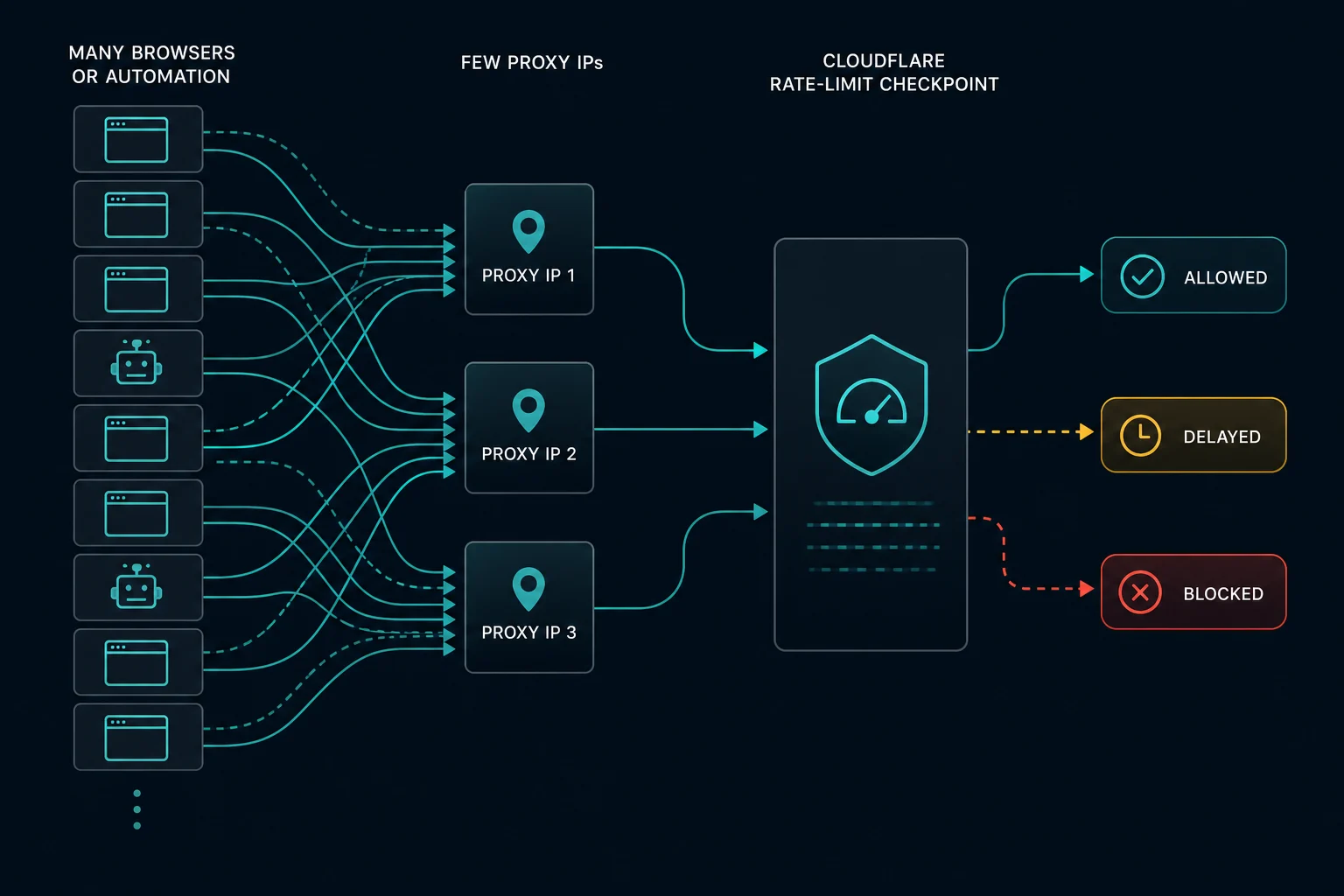
For scraping and automation, the most common problem is request concentration. If 200 tasks all run through the same IP or subnet, Cloudflare can treat that as one visitor hammering the site.
Cloudflare Error 1015 vs. Error 1020
Cloudflare Error 1015 and Error 1020 are both access blocks, but they usually point to different problems.
| Error | Meaning | Common scraper cause |
|---|---|---|
| Error 1015 | You are being rate limited | Too many requests in a short time |
| Error 1020 | Access denied by a rule | Firewall, WAF, country, IP, ASN, or request-profile block |
| HTTP 429 | Too many requests | Origin, API, CDN, or edge rate limit |
| HTTP 403 | Forbidden | Origin app, WAF, authentication, or access-policy denial |
If you see 1015, start with pacing and concurrency. If you see a plain rate-limit response instead of a Cloudflare-branded page, read the guide to HTTP 429 Too Many Requests. If you see 1020, start with firewall-rule signals, IP reputation, and request profile. If the response is a general forbidden status instead of a Cloudflare-branded page, read the guide to HTTP 403 Forbidden. For the access-denied version of this problem, read our guide to Cloudflare Error 1020.
How Long Does Cloudflare Error 1015 Last?
The block duration depends on the website's rate limiting configuration. Cloudflare rate limiting rules include a period for counting requests and a mitigation timeout for how long the action applies after the threshold is reached.
For visitors, the safest move is to stop retrying for a while. Repeated refreshes can keep you inside the rate-limit window and make the block feel longer.
For scrapers, do not immediately rotate and retry the exact same request at the same speed. That often spreads the same bad traffic pattern across more IPs and creates a wider block.
How to Fix Error 1015 as a Website Visitor
If you are browsing normally, use basic recovery steps:
- Stop refreshing the page.
- Wait before trying again.
- Close duplicate tabs for the same site.
- Clear cookies for the domain if the issue persists.
- Disable extensions that auto-refresh pages or modify requests.
- Turn off VPNs or free public proxies.
- Try a different network if your IP is shared by many users.
- Contact the site owner with the Ray ID if you are still blocked.
Cloudflare cannot usually remove this block for you. The website owner controls the rate limiting rules.
How to Fix Error 1015 as a Website Owner
If legitimate users are hitting Error 1015, inspect the rate limiting rule before turning it off.
Check:
- Which endpoint triggered the rule
- The request threshold
- The counting period
- The mitigation timeout
- Whether the rule counts by IP, path, country, header, cookie, or another characteristic
- Whether shared networks, mobile carriers, or enterprise NATs are being grouped too aggressively
Cloudflare recommends reviewing rate limiting thresholds and increasing very short windows when legitimate requests are blocked. For example, a rule that blocks based on a one-second window may be too strict for normal bursts. A longer period can be more forgiving while still limiting abuse.
Use narrow changes. A checkout endpoint may need strict limits, while a product page or documentation page may need a wider threshold.
How to Fix Cloudflare Error 1015 When Scraping
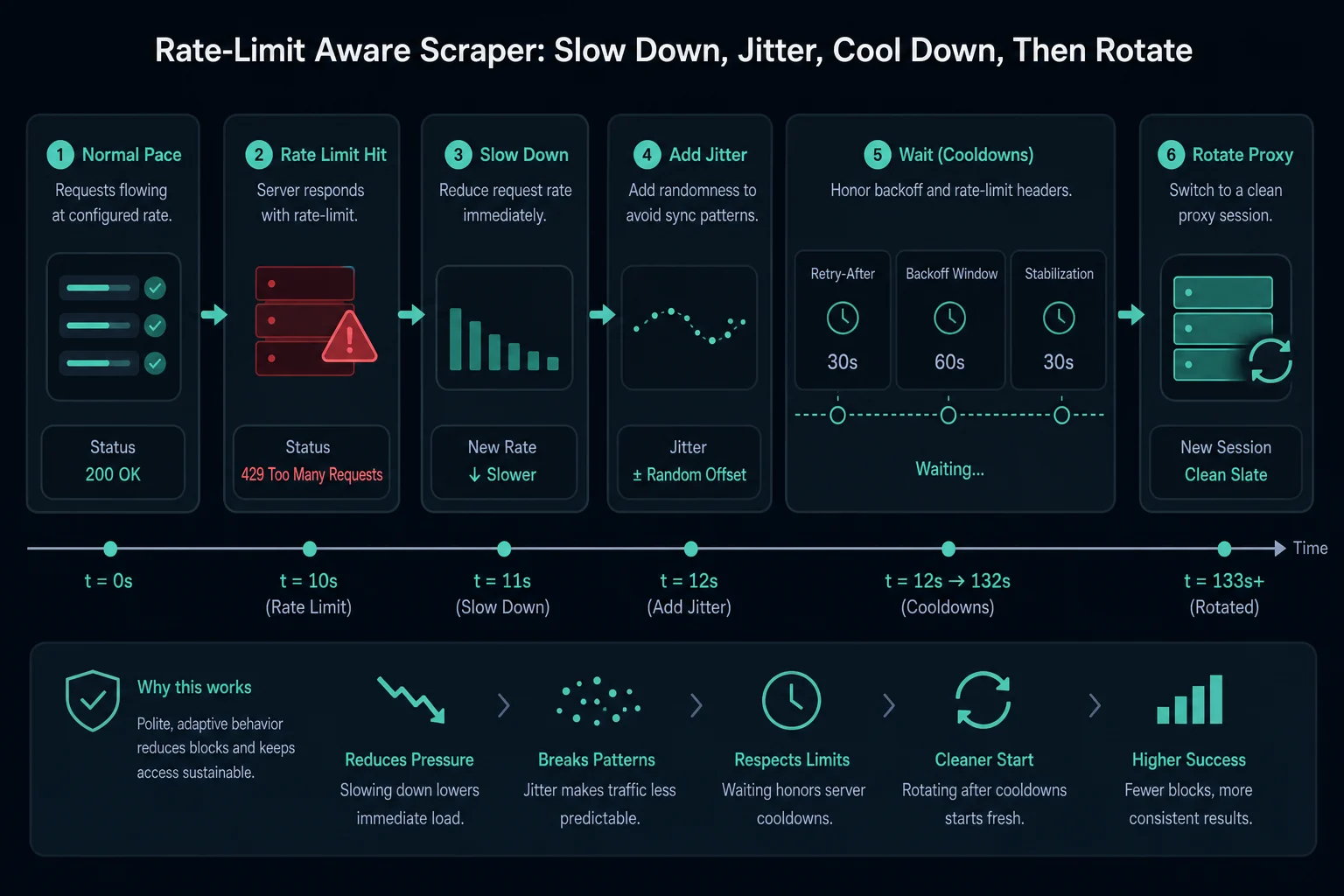
If your scraper gets Error 1015, slow down before you scale up.
Start with these checks:
- Reduce requests per second per IP.
- Add jitter so requests do not fire on an exact interval.
- Limit concurrent tasks per proxy.
- Reuse cookies and sessions instead of creating a new client for every request.
- Back off exponentially after 1015, 429, 403, or 1020 responses.
- Stop retrying the same blocked request immediately.
- Separate sensitive endpoints from public page monitoring.
- Log blocks by proxy, endpoint, method, user agent, and session.
- Make sure your scraper is allowed to access the target and respects applicable terms.
If you are monitoring many SKUs, products, ticket pages, or retail pages, your proxy count needs to match your delay. The Unknown Proxies delay calculator helps estimate how many proxies you need for your monitoring delay instead of overloading a small list.
When Proxies Help With Error 1015
Proxies help when Error 1015 is caused by too much traffic from one IP address, subnet, ASN, or shared network.
Use Unknown Proxies residential and ISP plans when your current setup is running too many tasks through the same IPs or when low-quality proxies are already heavily abused by other users.
Residential proxies are useful when you need rotating access from consumer-like networks and location diversity. ISP proxies are useful when you need stable sessions, fast response times, and dedicated IPs for monitoring or account workflows.
The key is not just adding more IPs. You still need to keep per-IP request volume reasonable. Better proxies plus bad retry logic can still trigger rate limits.
Residential vs. ISP Proxies for Rate Limits
Choose the proxy type based on the job:
| Proxy type | Best for | Why it helps with 1015 |
|---|---|---|
| Residential proxies | Rotating scraping, geo testing, browsing-like workflows | Spreads requests across consumer-style IPs |
| ISP proxies | Retail monitoring, account sessions, faster repeated workflows | Keeps stable sessions on cleaner dedicated IPs |
| Datacenter proxies | Low-security sites and cheap high-speed requests | Fast, but often easier to rate limit or block |
For sensitive sites, ISP and residential proxies usually outperform low-quality datacenter pools because the traffic does not look like thousands of users stacked behind the same obvious hosting range.
How to Prevent Error 1015
Preventing Cloudflare Error 1015 is mostly about controlling request volume.
Use these rules:
- Set a maximum request rate per proxy.
- Use random jitter around your delay.
- Add longer cooldowns after rate-limit responses.
- Avoid synchronized task starts.
- Keep sessions sticky when the workflow expects continuity.
- Do not hit login, cart, checkout, or search endpoints at the same rate as public pages.
- Rotate only when the session logic supports it.
- Watch block rate by endpoint, not just by proxy.
- Remove low-performing proxies instead of retrying harder.
For monitoring workflows, start conservative. If the site stays healthy, increase gradually. If 1015 appears, reduce concurrency before changing everything else.
FAQ
What does Cloudflare Error 1015 mean?
Cloudflare Error 1015 means the site has temporarily rate limited your access because too many requests were made in a configured time period.
Is Error 1015 the same as HTTP 429?
They are related. HTTP 429 means too many requests. Cloudflare Error 1015 is Cloudflare's branded rate-limit error page for a website's Cloudflare rate limiting rules.
Can proxies fix Error 1015?
Proxies can help if the block is caused by too much traffic from one IP or a poor-quality proxy network. They will not fix bad request pacing, retry loops, or endpoints that you are not allowed to access.
Should I rotate proxies after Error 1015?
Not immediately. First back off and reduce request rate. If only some proxies are blocked, rotate carefully and lower per-IP volume. If every proxy gets blocked, your request pattern is likely the bigger issue.
What is the best proxy type for Error 1015?
For scraping and automation, residential proxies are strong for rotation and location diversity. ISP proxies are strong for stable sessions and fast monitoring. The right choice depends on whether you need rotation or consistency.
Does refreshing the page make Error 1015 worse?
It can. If you keep refreshing inside the rate-limit window, you may continue triggering the rule. Wait before retrying.
Final Thoughts
Cloudflare Error 1015 means you are being rate limited. For visitors, the fix is usually patience, fewer refreshes, and a cleaner network. For site owners, the fix is tuning rate limiting thresholds so real users are not caught. For scrapers and automation operators, the fix is disciplined pacing: lower request volume, add jitter, respect cooldowns, and use better proxy infrastructure when IP concentration is part of the problem.
If your workflow is hitting Error 1015 because too many requests are coming from the same IPs, compare Unknown Proxies plans or use the delay calculator to size your proxy list before scaling up.
Technical references: Cloudflare Error 1015 documentation and Cloudflare rate limiting rules.