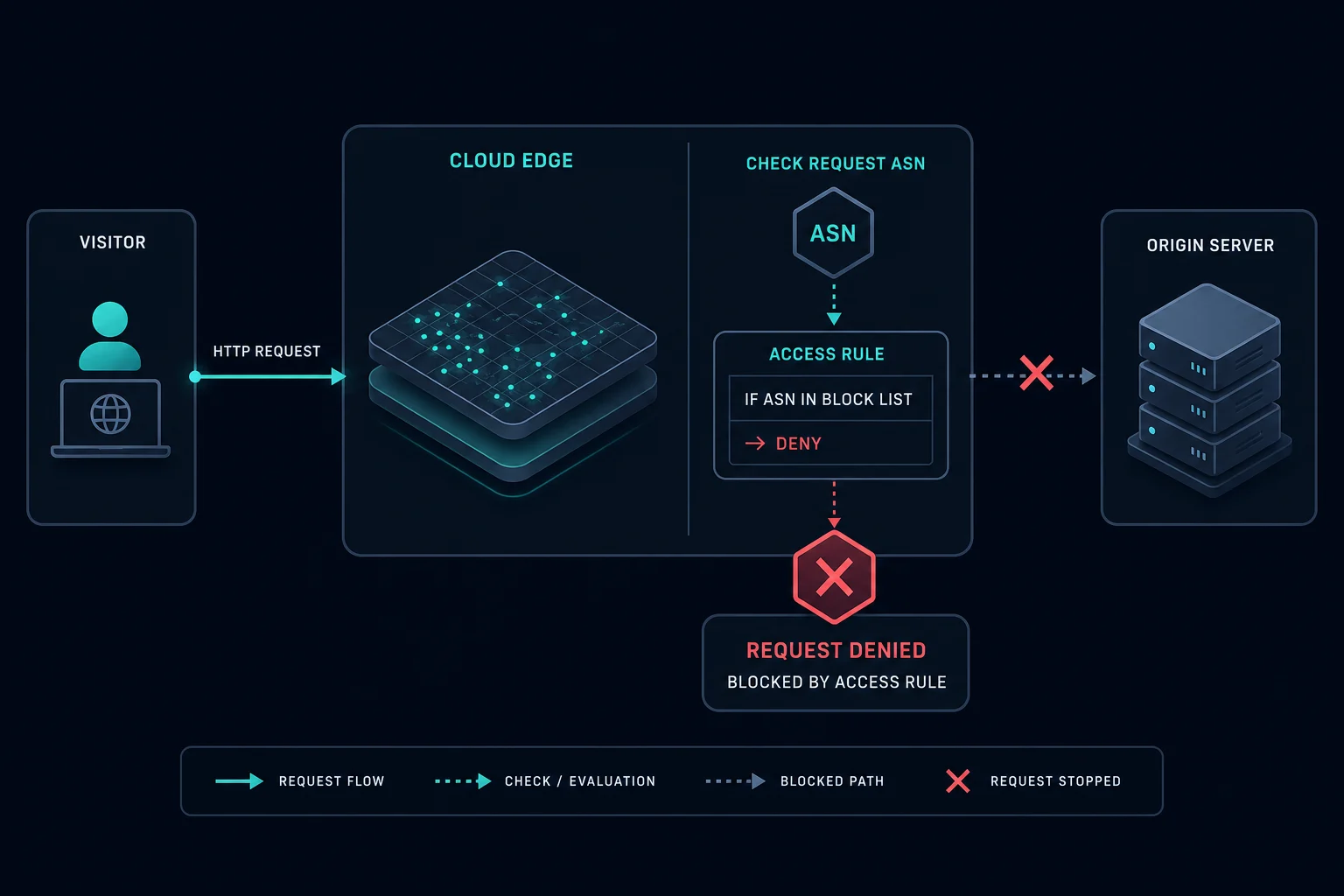
Error 1005 access denied means Cloudflare blocked the request because the website owner has banned the Autonomous System Number, or ASN, associated with the visitor's network.
An ASN is the network identifier for an internet provider, cloud host, mobile carrier, proxy network, VPN provider, or enterprise network. With Error 1005, the site itself may be working normally. The block is an access rule at Cloudflare's edge, not a sign that the origin server is down.
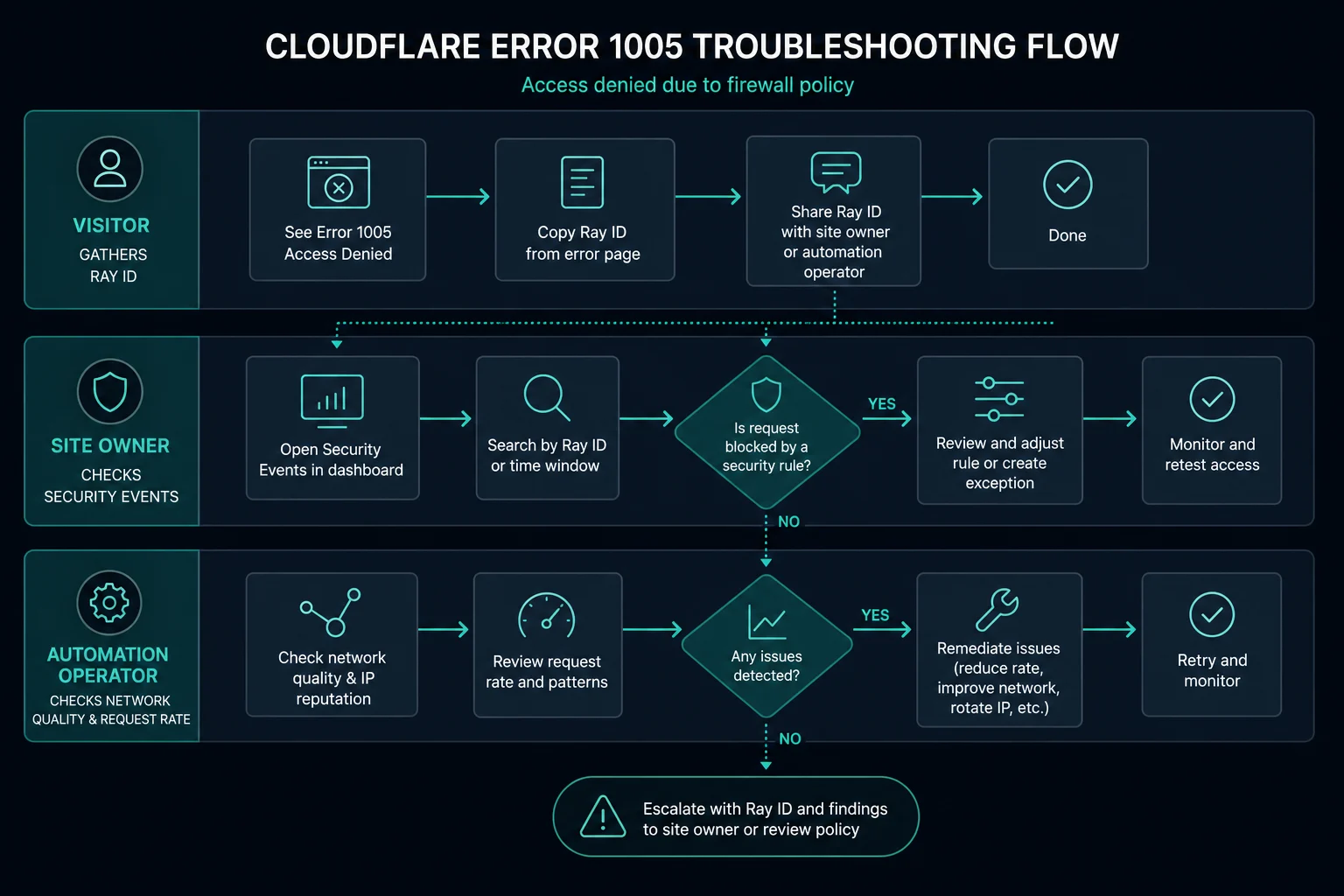
For visitors, the practical fix is to contact the website owner with the screenshot, Ray ID, time, and network details. For site owners, the fix is to inspect Cloudflare Security Events and adjust the IP Access Rule or related ASN block if it is too broad.
Quick Answer: How to Fix Error 1005 Access Denied
Start with the role that matches you:
| Situation | Best first step |
|---|---|
| You are a visitor | Save the screenshot, Ray ID, URL, and time, then contact the site owner |
| You use a VPN or proxy | Test without it, or use a different legitimate network if the site allows access |
| You own the site | Search Cloudflare Security Events by Ray ID or client IP |
| A whole ISP or proxy network is blocked | Review IP Access Rules and remove or narrow the ASN block if it catches valid users |
| Only automated traffic fails | Confirm the target allows your use case before changing proxy infrastructure |
Cloudflare's documentation describes Error 1005 as access denied because an ASN has been banned. That makes it close to Cloudflare Error 1020, but 1020 can be triggered by broader firewall rules, while 1005 points specifically to an ASN-based denial.
What Is Cloudflare Error 1005?
Cloudflare Error 1005 is an access-denied page caused by an ASN ban configured for the website.
The request path usually looks like this:
- A visitor requests a Cloudflare-protected website.
- Cloudflare receives the request at the edge.
- Cloudflare identifies the visitor IP and its ASN.
- The ASN matches a banned network rule.
- Cloudflare returns Error 1005 instead of forwarding the request to the origin.
That means the origin server may never see the request. If you are debugging server logs and cannot find the request, the block may have happened before the origin.
Error 1005 vs. 1020, 403, 1033, and 1101
These errors can all look like a failed page load, but they point to different layers.
| Error | Meaning | First place to check |
|---|---|---|
| Error 1005 | ASN banned | Cloudflare IP Access Rules and Security Events |
| Cloudflare Error 1020 | Firewall rule denied access | WAF events, request profile, IP, headers, country, or path |
| HTTP 403 Forbidden | Access forbidden by server, app, CDN, WAF, or API | Auth, permissions, WAF, request policy, and IP rules |
| Cloudflare Error 1033 | Cloudflare Tunnel is not connected or resolvable | Tunnel status and cloudflared connector health |
| Cloudflare Error 1101 | Worker threw an exception or failed to return a response | Worker logs, runtime exceptions, and deployment changes |
If the page says "ASN banned" or shows Cloudflare Error 1005, focus on network-level allow and block rules. If the page only says access denied with Error 1020, the rule may be based on a wider set of signals.
Why Error 1005 Happens
Common causes include:
- The website owner intentionally blocked an ASN.
- A security rule blocks traffic from a hosting provider, VPN, proxy provider, carrier, or enterprise network.
- The visitor is behind a shared network with poor reputation.
- A broad block catches legitimate users from the same ISP or mobile carrier.
- A scraper, bot, or monitoring system sends too much traffic from one provider network.
- A past abuse incident caused the site owner to block the whole network instead of individual IPs.
For normal visitors, Error 1005 can be a false positive. For automation teams, it often means the target does not trust the network carrying the traffic.
How to Fix Error 1005 as a Visitor
Visitors cannot override a Cloudflare ASN ban themselves. The website owner controls the rule.
Try:
- Refresh once to confirm it is not a temporary page load issue.
- Disable VPNs, public proxies, or privacy-routing tools.
- Try a normal home, mobile, or office connection if the site allows access.
- Capture the error screenshot, Ray ID, URL, and timestamp.
- Contact the website owner or support team.
Do not keep retrying aggressively. If the site is already treating your network as blocked, repeated requests can make support harder to interpret.
How to Fix Error 1005 as a Website Owner
If users report Error 1005 on your own site, start with the exact blocked request.
Ask the affected user for:
- Screenshot of the Error 1005 page
- Cloudflare Ray ID
- Timestamp, including timezone
- URL they tried to load
- Their approximate location
- Whether they were using a VPN, proxy, carrier network, or corporate network
Then search Cloudflare Security Events by Ray ID or client IP. Check whether an IP Access Rule, WAF rule, or security configuration is blocking the ASN.
If the rule is too broad, narrow it. Blocking a full ASN can be useful for obvious abusive networks, but it can also block an entire ISP, mobile carrier, workplace, hosting provider, or proxy provider. A more precise rule based on path, country, reputation, rate, or known abusive IPs may reduce false positives.
How to Handle Error 1005 in Scraping or Automation
For scraping, monitoring, retail automation, and API workflows, Error 1005 means the network identity matters. Before changing IPs, confirm the target allows your use case and that your traffic pattern is responsible.
Check:
- Are you respecting the site's terms, robots guidance, and account permissions?
- Are you sending too many requests from one ASN or subnet?
- Are retries creating bursts after errors?
- Are headers, cookies, sessions, and request order consistent?
- Does the same request work from a normal browser on an allowed network?
- Does only one provider network fail?
If only one proxy or hosting network is blocked, the ASN may be the trigger. A cleaner residential or ISP proxy setup can help legitimate workflows avoid false positives caused by poor network reputation. If every network is blocked, the issue is more likely request behavior, authentication, site policy, or a firewall rule like Cloudflare Error 1020.
When Proxies Help With Error 1005
Proxies help only when the ASN ban is blocking a network that is not appropriate for your legitimate access pattern. For example, a target may block a low-quality datacenter ASN, an abused public proxy network, or an overused VPN provider.
In that case, switching to better proxy infrastructure can reduce false positives. Residential proxies are useful for broad rotation and geo testing. ISP proxies are useful when you need stable sessions and cleaner dedicated IPs. Compare Unknown Proxies plans if your current proxy network is the reason valid requests are being grouped into a blocked ASN.
Proxies do not fix missing permission, forbidden use cases, broken auth, or website-owner rules that intentionally block your activity. Treat Error 1005 as a signal to debug access policy first.
How to Prevent Error 1005
For site owners:
- Avoid broad ASN bans unless the risk clearly justifies them.
- Prefer scoped rules by path, rate, behavior, country, or verified abuse signal.
- Review Security Events before blocking a whole provider network.
- Use temporary or challenge-based actions when the signal is uncertain.
- Keep support instructions ready for legitimate users who get blocked.
For automation teams:
- Keep request rates conservative.
- Avoid concentrating all traffic through one risky ASN.
- Use sticky sessions where the workflow expects continuity.
- Monitor blocks by ASN, proxy provider, endpoint, and account.
- Back off after access errors instead of retrying in a tight loop.
FAQ
What does Error 1005 access denied mean?
Error 1005 access denied means Cloudflare blocked your request because the website owner banned the ASN associated with your network.
Is Error 1005 caused by my browser?
Usually, no. Browser cookies or extensions may affect some access errors, but Error 1005 specifically points to a network-level ASN ban.
Is Error 1005 the same as Cloudflare Error 1020?
No. Error 1005 is tied to an ASN ban. Cloudflare Error 1020 means a Cloudflare firewall rule denied access and may involve many signals.
Can I fix Error 1005 by changing proxies?
Sometimes, but only if the blocked ASN belongs to the proxy or VPN network you are using and the site allows your use case. If the site owner intentionally blocks your activity, changing IPs is not the real fix.
What should I send to the site owner?
Send the Error 1005 screenshot, Ray ID, URL, timestamp with timezone, and a note about whether you were using a VPN, proxy, mobile carrier, workplace network, or normal home connection.
Final Thoughts
Error 1005 access denied means Cloudflare blocked access because the request came from a banned ASN. Visitors should collect the Ray ID and contact the site owner. Site owners should inspect Cloudflare Security Events and confirm whether the ASN block is intentional and narrow enough. Scraping and automation teams should debug request behavior and network quality before changing proxy infrastructure.
For related access-denied errors, compare this with Cloudflare Error 1020 and HTTP 403 Forbidden. If the page instead points to a tunnel or Worker runtime problem, read Cloudflare Error 1033 or Cloudflare Error 1101.
Technical reference: Cloudflare Error 1005 documentation.